ProxySQL 1.4.5 and Updated proxysql-admin Tool Now in the Percona Repository

ProxySQL 1.4.5

ProxySQL 1.4.5ProxySQL 1.4.5, released by ProxySQL, is now available for download in the Percona Repository along with an updated version of Percona’s proxysql-admin tool.

ProxySQL is a high-performance proxy, currently for MySQL and its forks (like Percona Server for MySQL and MariaDB). It acts as an intermediary for client requests seeking resources from the database. René Cannaò created ProxySQL for DBAs as a means of solving complex replication topology issues.

The ProxySQL 1.4.5 source and binary packages available at https://percona.com/downloads/proxysql include ProxySQL Admin – a tool, developed by Percona to configure Percona XtraDB Cluster nodes into ProxySQL. Docker images for release 1.4.5 are available as well: https://hub.docker.com/r/percona/proxysql/. You can download the original ProxySQL from https://github.com/sysown/proxysql/releases.

This release fixes the following bugs in ProxySQL Admin:

Usability improvements:

  • #PSQLADM-6: If the cluster node goes offline, the proxysql_node_monitor script now sets the node status as OFFLINE_HARD, and does not remove it from the ProxySQL database. Also, logging is consistent regardless of the cluster node online status.
  • #PSQLADM-30: Validation was added for the host priority file.
  • #PSQLADM-33: Added --proxysql-datadir option to run the proxysql-admin script with a custom ProxySQL data directory.
  • Also, BATS test suite was added for the proxysql-admin testing.

Bug fixes:

  • Fixed#PSQLADM-5: PXC mode specified with proxysql-admin with use of --mode parameter was not persistent.
  • Fixed#PSQLADM-8: ProxySQL High CPU load took place when mysqld was hanging.

ProxySQL is available under OpenSource license GPLv3.

This Week in Data with Colin Charles 28: Percona Live, MongoDB Transactions and Spectre/Meltdown Rumble On

Colin Charles

Colin CharlesJoin Percona Chief Evangelist Colin Charles as he covers happenings, gives pointers and provides musings on the open source database community.

In case you missed last week’s column, don’t forget to read the fairly lengthy FOSDEM MySQL & Friends DevRoom summary.

From a Percona Live Santa Clara 2018 standpoint, beyond the tutorials getting picked and scheduled, the talks have also been picked and scheduled (so you were very likely getting acceptance emails from the Hubb.me system by Tuesday). The rejections have not gone out yet but will follow soon. I expect the schedule to go live either today (end of week) or early next week. Cheapest tickets end March 4, so don’t wait to register!

Amazon Relational Database Service has had a lot of improvements in 2017, and the excellent summary from Jeff Barr is worth a read: Amazon Relational Database Service – Looking Back at 2017. Plenty of improvements for the MySQL, MariaDB Server, PostgreSQL and Aurora worlds.

Spectre/Meltdown and its impact are still being discovered. You need to read Brendan Gregg’s amazing post: KPTI/KAISER Meltdown Initial Performance Regressions. And if you visit Percona Live, you’ll see an amazing keynote from him too! Are you still using MyISAM? MyISAM and KPTI – Performance Implications From The Meltdown Fix suggests switching to Aria or InnoDB.

Probably the biggest news this week though? Transactions are coming to MongoDB 4.0. From the site, “MongoDB 4.0 will add support for multi-document transactions, making it the only database to combine the speed, flexibility, and power of the document model with ACID guarantees. Through snapshot isolation, transactions will provide a globally consistent view of data, and enforce all-or-nothing execution to maintain data integrity.”. You want to read the blog post, MongoDB Drops ACID (the title works if you’re an English native speaker, but maybe not quite if you aren’t). The summary diagram was a highlight for me because you can see the building blocks, plus future plans for MongoDB 4.2.

Releases

Link List

Upcoming appearances

  • SCALE16x – Pasadena, California, USA – March 8-11 2018
  • FOSSASIA 2018 – Singapore – March 22-25 2018

Feedback

I look forward to feedback/tips via e-mail at colin.charles@percona.com or on Twitter @bytebot.

Why ZFS Affects MySQL Performance

zfs

In this blog post, we’ll look at how ZFS affects MySQL performance when used in conjunction.

ZFS and MySQL have a lot in common since they are both transactional software. Both have properties that, by default, favors consistency over performance. By doubling the complexity layers for getting committed data from the application to a persistent disk, we are logically doubling the amount of work within the whole system and reducing the output. From the ZFS layer, where is really the bulk of the work coming from?

Consider a comparative test below from a bare metal server. It has a reasonably tuned config (discussed in separate post, results and scripts here). These numbers are from sysbench tests on hardware with six SAS drives behind a RAID controller with a write-backed cache. Ext4 was configured with RAID10 softraid, while ZFS is the same (striped three pairs of mirrored VDEvs).

There are a few obvious observations here, one being ZFS results have a high variance between median and the 95th percentile. This indicates a regular sharp drop in performance. However, the most glaring thing is that with write-only only workloads of update-index, overall performance could drop to 50%:

ZFSZFS ZFS

Looking further into the IO metrics for the update-index tests (95th percentile from /proc/diskstats), ZFS’s behavior tells us a few more things.

ZFS


  1. ZFS batches writes better, with minimal increases in latency with larger IO size per operation.
  2. ZFS reads are heavily scattered and random – the high response times and low read IOPs and throughput means significantly higher disk seeks.

If we focus on observation #2, there are a number of possible sources of random reads:

  • InnoDB pages that are not in the buffer pool
  • When ZFS records are updated, metadata also has to be read and updated

This means that for updates on cold InnoDB records, multiple random reads are involved that are not present with filesystems like ext4. While ZFS has some tunables for improving synchronous reads, tuning them can be touch and go when trying to fit specific workloads. For this reason, ZFS introduced the use of L2ARC, where faster drives are used to cache frequently accessed data and read them in low latency.

We’ll look more into the details how ZFS affects MySQL, the tests above and the configuration behind them, and how we can further improve performance from here in upcoming posts.

System Urusniaga – Company Group

Ini adalah paparan Company Group yang terdapat dalam module company di System Urusniaga. Di company Group ini anda boleh mencipta senarai grup bagi syarikat-syarikat yang telah dicipta pada bahagian Company List. Untuk menambah Company Group, Anda perlu mengisi borang yang disediakan seterusnya menyimpan maklumat tersebut. — sila cuba dengan gembira https://urusniaga.my

system-urusniaga-company-group

Company – Mailer

Ini adalah paparan Mailer yang terdapat dalam module company di System Urusniaga. Fungsi Mailer ini membolehkan anda menghantar e-mel kepada pelanggan mahu pun pembekal. Secara default, sistem akan menghantar e-mel menggunakan domain urusniaga.my.

Anda boleh menggunakan e-mel anda sendiri untuk kelihatan e-mel dihantar dari anda dan setiap company boleh dikonfigurasi menggunakan mailer yang pelbagai. Mailer bermaksud, penghantar e-mel. — sila cuba dengan gembira https://urusniaga.my

Products & Services – Stock Management Updates Notifications

System Urusniaga Stock Management di modules Products & Services telah dikemaskini mempunyai notifikasi yang akan memberitahu apabila stok produk anda telah mencapai minimum, notifikasi ini boleh di enable apabila anda “Tetapkan Amaran apabila stok mencapai minimum” pada produk fizikal yang anda mahukan. — sila cuba dengan gembira https://urusniaga.my


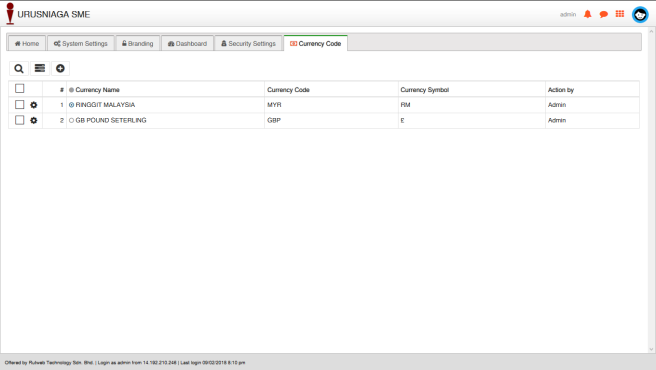
Settings – Currency Code

Ini adalah paparan Currency Code yang terdapat dibahagian Setting System Urusniaga, yang membolehkan anda membuat tetapan untuk menambah kod mata wang yang baharu, mengemaskini kod mata wang yang sedia ada dan memadam kod mata wang. Untuk menambah kod mata wang, Anda perlu mengisi borang yang disediakan dan seterusnya menyimpan maklumat tersebut. — sila cuba dengan gembira https://urusniaga.my

Company – Tax Rates

Ini adalah paparan Tax Rates yang terdapat dalam module company di System Urusniaga. Fungsi kadar cukai ini membenarkan Anda untuk menambah, mengemaskini dan memadam cukai yang telah ditetapkan. Buat masa ini Cukai GST telah ditambah secara lalai dan kadar cukai 6% mengikut kadar yang ditetapkan oleh Pihak KASTAM. — sila cuba dengan gembira https://urusniaga.my

system-urusniaga-company-tax-rate

Settings – Security Settings

Ini adalah paparan Security settings yang terdapat dibahagian Setting System Urusniaga, yang membolehkan anda membuat tetapan keselamatan merangkumi tetapan bagi menetapkan panjang minimum kata laluan yang perlu dibina, pengesahan kekuatan kata laluan, mengaktifkan fungsi untuk mendapatkan semula kata laluan, mengaktifkan fungsi sekatan padan cubaan log masuk yang gagal, menetapkan jumlah cubaan log masuk yang boleh dilakukan dan menetapkan masa luput bagi sekatan log masuk. — sila cuba dengan gembira https://urusniaga.my