Charset and Collation Settings Impact on MySQL Performance

MySQL 8.0 utf8mb4

Following my post MySQL 8 is not always faster than MySQL 5.7, this time I decided to test very simple read-only CPU intensive workloads, when all data fits memory. In this workload there is NO IO operations, only memory and CPU operations.

My Testing Setup

Environment specification

  • Release | Ubuntu 18.04 LTS (bionic)
  • Kernel | 4.15.0-20-generic
  • Processors | physical = 2, cores = 28, virtual = 56, hyperthreading = yes
  • Models | 56xIntel(R) Xeon(R) Gold 5120 CPU @ 2.20GHz<
  • Memory Total | 376.6G
  • Provider | packet.net x2.xlarge.x86 instance

I will test two workloads, sysbench oltp_read_only and oltp_point_select varying amount of threads

sysbench oltp_read_only --mysql-ssl=off --report-interval=1 --time=300 --threads=$i --tables=10 --table-size=10000000 --mysql-user=root run

sysbench oltp_point_select --mysql-ssl=off --report-interval=1 --time=300 --threads=$i --tables=10 --table-size=10000000 --mysql-user=root run

The results for OLTP read-only (latin1 character set):

MySQL 5.7.25MySQL 8.0.15
threadsthroughputthroughputthroughput ratio
11241.181114.41.11
44578.184106.691.11
1615763.6414303.541.10
2421384.5719472.891.10
3225081.1722897.041.10
4832363.2729600.261.09
6439629.0935585.881.11
12838448.2334718.421.11
25636306.4432798.121.11

The results for point_select (latin1 character set):

point selectMySQL 5.7.25MySQL 8.0.15
threadsthroughputthroughputthroughput ratio
131672.5228344.251.12
4110650.798296.461.13
16390165.41347026.491.12
24534454.55474024.561.13
32620402.74554524.731.12
48806367.3718350.871.12
641120586.03972366.591.15
1281108638.47960015.171.15
2561038166.63891470.111.16

We can see that in the OLTP read-only workload, MySQL 8.0.15 is slower by 10%, and for the point_select workload MySQL 8.0.15 is slower by 12-16%.

Although the difference is not necessarily significant, this is enough to reveal that MySQL 8.0.15 does not perform as well as MySQL 5.7.25 in the variety of workloads that I am testing.

However, it appears that the dynamic of the results will change if we use the utf8mb4 character set instead of latin1.

Let’s compare MySQL 5.7.25 latin1 vs utf8mb4, as utf8mb4 is now default CHARSET in MySQL 8.0

But before we do that let’s take look also at COLLATION.

MySQL 5.7.25 uses a default collation utf8mb4_general_ci, However, I read that to use proper sorting and comparison for Eastern European languages, you may want to use the utf8mb4_unicode_ci collation. For MySQL 8.0.5 the default collation is

So let’s compare each version latin1 vs utf8mb4 (with default collation). First 5.7:

Threadsutf8mb4_general_cilatin1latin1 ratio
42957.994578.181.55
2413792.5521384.571.55
6424516.9939629.091.62
12823977.0738448.231.60

So here we can see that utf8mb4 in MySQL 5.7 is really much slower than latin1 (by 55-60%)

And the same for MySQL 8.0.15

MySQL 8.0 defaultcollations

Threadsutf8mb4_0900_ai_ci (default)latin1latin1 ratio
43968.884106.691.03
2418446.1919472.891.06
6432776.3535585.881.09
12831301.7534718.421.11

For MySQL 8.0 the hit from utf8mb4 is much lower (up to 11%)

Now let’s compare all collations for utf8mb4

For MySQL 5.7

MySQL 5.7 utf8mb4

utf8mb4_general_ci (default)utf8mb4_binutf8mb4_unicode_ciutf8mb4_unicode_520_ci
42957.993328.82157.611942.78
2413792.5515857.299989.969095.17
6424516.9928125.1616207.2614768.64
12823977.0727410.9415970.614560.6

If you plan to use utf8mb4_unicode_ci, you will get an even further performance hit (comparing to utf8mb4_general_ci )

And for MySQL 8.0.15

MySQL 8.0 utf8mb4

utf8mb4_general_ciutf8mb4_binutf8mb4_unicode_ciutf8mb4_0900_ai_ci (default)
43461.83628.013363.73968.88
2416327.4517136.1615740.8318446.19
6428960.6230390.2927242.7232776.35
12827967.2529256.8926489.8331301.75

So now let’s compare MySQL 8.0 vs MySQL 5.7 in utf8mb4 with default collations:

mysql 8 and 5.7 default collation

MySQL 8.0 utf8mb4_0900_ai_ciMySQL 5.7 utf8mb4_general_ciMySQL 8.0 ratio
43968.882957.991.34
2418446.1913792.551.34
6432776.3524516.991.34
12831301.7523977.071.31

So there we are. In this case, MySQL 8.0 is actually better than MySQL 5.7 by 34%

Conclusions

There are several observations to make:

  • MySQL 5.7 outperforms MySQL 8.0 in latin1 charset
  • MySQL 8.0 outperforms MySQL 5.7 by a wide margin if we use utf8mb4 charset
  • Be aware that utf8mb4  is now default MySQL 8.0, while MySQL 5.7 has latin1 by default
  • When running comparison between MySQL 8.0 vs MySQL 5.7 be aware what charset you are using, as it may affect the comparison a lot.

MySQL 8.0 Bug 94394, Fixed!

MySQL optimizer bugs

MySQL optimizer bugs

Last week I came across a bug in MySQL 8.0, which meant that the absence of mysql.user leads to auto-apply of –skip-grant-tables (#94394) would leave MySQL running in an undesirable state. My colleague Sveta Smirnova blogged about the issue and it also caught the interest of Valeriy Kravchuk in Fun with Bugs #80 – On MySQL Bug Reports I am Subscribed to, Part XVI. Thanks for the extra visibility!

Credit is now due to Oracle for the quick response, as it was fixed in less than one week (including a weekend):

Fixed in 8.0.16.

Previously, if the grant tables were corrupted, the MySQL server
wrote a message to the error log but continued as if the
–skip-grant-tables option had been specified. This resulted in the
server operating in an unexpected state unless –skip-grant-tables
had in fact been specified. Now, the server stops after writing a
message to the error log unless started with –skip-grant-tables.
(Starting the server with that option enables you to connect to
perform diagnostic operations.)

I think that this particular bug reflects some of the nice things about the MySQL community (and Open Source in general); anyone can find and report a bug, or make a feature request, to one of the software vendors (MySQL, Percona, or MariaDB) and try to improve the software. Sometimes bugs hang around for a while, either because they are hard to fix, viewed as lower in priority (despite the reporter’s opinion), or perhaps the bug does not have enough public visibility. Then a member of the community notices the bug and takes an interest and soon there is more interest. If you are lucky the bug gets fixed quickly! You can of course also provide a fix for the bug yourself, which may speed up the process with a little luck.

If you have not yet reported a bug, or want to find if you are reporting them in the right sort of way then you can take a look at How to create a useful MySQL bug report…and make sure it’s properly processed by Valeriy from FOSDEM 2019.

? ? ? You can help to find more!

Percona Server for MongoDB 4.0.6-3 Is Now Available

Percona Server for MongoDB

Percona Server for MongoDB

Percona announces the release of Percona Server for MongoDB 4.0.6-3 on February 28, 2019. Download the latest version from the Percona website or the Percona software repositories.

Percona Server for MongoDB is an enhanced, open source, and highly-scalable database that is a fully-compatible, drop-in replacement for MongoDB 4.0 Community Edition. It supports MongoDB 4.0 protocols and drivers.

Percona Server for MongoDB extends the functionality of the MongoDB 4.0 Community Edition by including the Percona Memory Engine storage engine, encrypted WiredTiger storage engineaudit loggingSASL authenticationhot backups, and enhanced query profilingPercona Server for MongoDB requires no changes to MongoDB applications or code.

Release 4.0.6-3 extends the buildInfo command with the psmdbVersion key to report the version of Percona Server for MongoDB. If this key exists then Percona Server for MongoDB is installed on the server. This key not available from MongoDB.

This release includes all features of MongoDB 4.0 Community Edition 4.0. Most notable among these are:

Note that the MMAPv1 storage engine is deprecated in MongoDB 4.0 Community Edition 4.0.

Improvements

  • PSMDB-216: The database command buildInfo provides the psmdbVersion key to report the version of Percona Server for MongoDB. If this key exists then Percona Server for MongoDB is installed on the server. This key is not available from MongoDB.

The Percona Server for MongoDB 4.0.6-3 release notes are available in the official documentation.

Percona XtraDB Cluster 5.7.25-31.35 Is Now Available

Percona XtraDB Cluster 5.7

Percona XtraDB Cluster 5.7Percona is glad to announce the release of Percona XtraDB Cluster 5.7.25-31.35 on February 28, 2018. Binaries are available from the downloads section or from our software repositories.

This release of Percona XtraDB Cluster includes the support of Ubuntu 18.10 (Cosmic Cuttlefish). Percona XtraDB Cluster 5.7.25-31.35 is now the current release, based on the following:

All Percona software is open-source and free.

Bugs Fixed

  • PXC-2346mysqld could crash when executing mysqldump --single-transaction while the binary log is disabled. This problem was also reported in PXC-1711PXC-2371PXC-2419.
  • PXC-2388: In some cases, DROP FUNCTION function_name was not replicated.

Help us improve our software quality by reporting any bugs you encounter using our bug tracking system. As always, thanks for your continued support of Percona!

Percona XtraDB Cluster 5.6.43-28.32 Is Now Available

Percona XtraDB Cluster 5.7

Percona XtraDB Cluster 5.7

Percona is glad to announce the release of Percona XtraDB Cluster 5.6.43-28.32 on February 28, 2019. Binaries are available from the downloads section or from our software repositories.

This release of Percona XtraDB Cluster includes the support of Ubuntu 18.10 (Cosmic Cuttlefish). Percona XtraDB Cluster 5.6.43-28.32 is now the current release, based on the following:

All Percona software is open-source and free.

Bugs Fixed

  • PXC-2388: In some cases, DROP FUNCTION function_name was not replicated.

Help us improve our software quality by reporting any bugs you encounter using our bug tracking system. As always, thanks for your continued support of Percona!

PostgreSQL Webinar Wed April 17 – Upgrading or Migrating Your Legacy PostgreSQL to Newer PostgreSQL Versions

upgrade postgresql webinar series

PostgreSQL logoA date for your diary. On Wednesday, April 17 at 7:00 AM PDT (UTC-7) / 10:00 AM EDT (UTC-4) Percona’s PostgreSQL Support Technical Lead, Avinash Vallarapu and Senior Support Engineers, Fernando Laudares, Jobin Augustine and Nickolay Ihalainen, will demonstrate the upgrade of a legacy version of PostgreSQL to a newer version, using built-in as well as open source tools. In the lead up to the live webinar, we’ll be publishing a series of five blog posts that will help you to understand the solutions available to perform a PostgreSQL upgrade.

Register Now

Synopsis

Are you stuck with an application that is using an older version PostgreSQL which is no longer supported? Are you looking for the methods available to upgrade a legacy version PostgreSQL cluster (< PostgreSQL 9.3)? Are you searching for solutions that could upgrade your PostgreSQL with a minimalistic downtime? Are you afraid that your application may not work with latest PostgreSQL versions as it was built on a legacy version, a few years ago? Do you want to confirm if you are doing your PostgreSQL upgrades the right way ? Do you think that you need to buy an enterprise license to minimize the downtime involved in upgrades?

Then we suggest you to subscribe to our webinar, that should answer most of your questions around PostgreSQL upgrades.

This webinar starts with a list of solutions that are built-in to PostgreSQL to help us upgrade a legacy version of PostgreSQL with minimal downtime. The advantages of choosing such methods will also be discussed. You’ll notice a list of prerequisites for each solution, reducing the scope of possible mistakes. It’s important to minimize downtime when upgrading from an older version of PostgreSQL server. Therefore, we will present three open source solutions that will help us either to minimize or to completely avoid downtime.

Our presentation will show the full process of upgrading a set of PostgreSQL servers to the latest available version. Furthermore, we’ll show the pros and cons for each of the methods we employed.

The webinar programme

Topics covered in this webinar will include:

  1. PostgreSQL upgrade using pg_dump/pg_restore (with downtime)
  2. PostgreSQL upgrade using pg_dumpall (with downtime)
  3. Continuous replication from a legacy PostgreSQL version to a newer version using Slony.
  4. Replication between major PostgreSQL versions using Logical Replication.
  5. Fast upgrade of legacy PostgreSQL with minimum downtime.

In the 45 minute session, we’ll walk you through the methods and demonstrate some of the methods you may find useful in your database environment. We’ll see how simple and quick it is to perform the upgrade using our approach.

Register Now


Image adapted from Photo by Magda Ehlers from Pexels

Upcoming Webinar Wed 3/6: High Availability and Disaster Recovery in Amazon RDS

High Availability and Disaster Recovery in Amazon RDS Webinar

MySQL High Availability and Disaster Recovery WebinarJoin Percona CEO Peter Zaitsev as he presents High Availability and Disaster Recovery in Amazon RDS on Wednesday, March 6th, 2019, at 11:00 AM PST (UTC-8) / 2:00 PM EST (UTC-5).

Register Now

In this hour-long webinar, Peter describes the differences between high availability (HA) and disaster recovery (DR). Afterward, Peter will go through scenarios detailing how each is handled manually and in Amazon RDS.

He will review the pros and cons of managing HA and DR in the traditional database environment as well in the cloud. Having full control of these areas is daunting. However, Amazon RDS makes meeting these needs easier and more efficient.

Regardless of which path you choose, monitoring your environment is vital. Peter’s talk will make that message clear. A discussion of metrics you should regularly review to keep your environment working correctly and performing optimally concludes the webinar.

In order to learn more register for Peter’s webinar on High Availability and Disaster Recovery in Amazon RDS.

Percona XtraBackup 8.0.5 Is Now Available

Percona XtraBackup 8.0

Percona XtraBackup 8.0

Percona is glad to announce the release of Percona XtraBackup 8.0.5 on March 4, 2019. Downloads are available from our download site and from apt and yum repositories.

Percona XtraBackup enables MySQL backups without blocking user queries, making it ideal for companies with large data sets and mission-critical applications that cannot tolerate long periods of downtime. Offered free as an open source solution, it drives down backup costs while providing unique features for MySQL backups.

Percona XtraBackup 8.0.5 introduces the support of undo tablespaces created using the new syntax (CREATE UNDO TABLESPACEavailable since MySQL 8.0.14. Percona XtraBackup also supports the binary log encryption introduced in MySQL 8.0.14.

Two new options were added to xbstream. Use the --decompress option with xbstream to decompress individual qpress files. With the --decompress-threads option, specify the number of threads to apply when decompressing. Thanks to Rauli Ikonen for this contribution.

This release of Percona XtraBackup is a General Availability release ready for use in a production environment.

All Percona software is open-source and free.

Please note the following about this release:

  • The deprecated innobackupex has been removed. Use the xtrabackup command to back up your instances: $ xtrabackup --backup --target-dir=/data/backup
  • When migrating from earlier database server versions, backup and restore and using Percona XtraBackup 2.4 and then use mysql_upgrade from MySQL 8.0.x
  • If using yum or apt repositories to install Percona XtraBackup 8.0.5, ensure that you have enabled the new tools repository. You can do this with the percona-release enable tools release command and then install the percona-xtrabackup-80 package.

New Features

  • PXB-1548: Percona XtraBackup enables updating the ib_buffer_pool file with the latest pages present in the buffer pool using the --dump-innodb-buffer-pool option. Thanks to Marcelo Altmann for contribution.
  • PXB-1768: Added support for undo tablespaces created with the new MySQL 8.0.14 syntax.
  • PXB-1781: Added support for binary log encryption introduced in MySQL 8.0.14.
  • PXB-1797: For xbstream, two new options were added. The --decompress option enables xbstream to decompress individual qpress files. The --decompress-threads option controls the number of threads to apply when decompressing. Thanks to Rauli Ikonen for this contribution.

Bugs Fixed

  • Using --lock-ddl-per-table caused the server to scan all records of partitioned tables which could lead to the “out of memory” error. Bugs fixed PXB-1691 and PXB-1698.
  • When Percona XtraBackup was started run with the --slave-info, incorrect coordinates were written to the xtrabackup_slave_info file. Bug fixed PXB-1737
  • Percona XtraBackup could crash at the prepare stage when making an incremental backup if the variable innodb-rollback-segments was changed after starting the MySQL Server. Bug fixed PXB-1785.
  • The full backup could fail when Percona Server was started with the --innodb-encrypt-tables parameter. Bug fixed PXB-1793.

Other bugs fixed: PXB-1632PXB-1715PXB-1770PXB-1771PXB-1773.

How to Upgrade Amazon Aurora MySQL from 5.6 to 5.7

Over time, software evolves and it is important to stay up to date if you want to benefit from new features and performance improvements.  Database engines follow the exact same logic and providers are always careful to provide an easy upgrade path. With MySQL, the mysql_upgrade tool serves that purpose.

A database upgrade process becomes more challenging in a managed environment like AWS RDS where you don’t have shell access to the database host and don’t have access to the SUPER MySQL privilege. This post is a collaboration between Fattmerchant and Percona following an engagement focused on the upgrade of the Fattmerchant database from Amazon Aurora MySQL 5.6 to Amazon Aurora MySQL 5.7. Jacques Fu, the CTO of Fattmerchant, is the co-author of this post.  Our initial plan was to follow a path laid out previously by others but we had difficulties finding any complete and detailed procedure outlining the steps. At least, with this post, there is now one.

Issues with the regular upgrade procedure

How do we normally upgrade a busy production server with minimal downtime?  The simplest solution is to use a slave server with the newer version. Such a procedure has the side benefit of providing a “staging” database server which can be used to test the application with the new version. Basically we need to follow these steps:

  1. Enable replication on the old server
  2. Make a consistent backup
  3. Restore the backup on a second server with the newer database version – it can be a temporary server
  4. Run mysql_upgrade if needed
  5. Configure replication with the old server
  6. Test the application against the new version. If the tests includes conflicting writes, you may have to jump back to step 3
  7. If tests are OK and the new server is in sync, replication wise, with the old server, stop the application (only for a short while)
  8. Repoint the application to the new server
  9. Reset the slave
  10. Start the application

If the new server was temporary, you’ll need to repeat most of the steps the other way around, this time starting from the new server and ending on the old one.

What we thought would be a simple task turned out to be much more complicated. We were preparing to upgrade our database from Amazon Aurora MySQL 5.6 to 5.7 when we discovered that there was no option for an in-place upgrade. Unlike a standard AWS RDS MySQL (RDS MySQL upgrade 5.6 to 5.7) at the time of this article you cannot perform an in-place upgrade or even restore a backup across the major versions of Amazon Aurora MySQL.

We initially chose Amazon Aurora for the benefits of the tuning work that AWS provided out of the box, but we realized with any set of pros there comes a list of cons. In this case, the limitations meant that something that should have been straightforward took us off the documented path.

Our original high-level plan

Since we couldn’t use an RDS snapshot to provision a new Amazon Aurora MySQL 5.7 instance, we had to fallback to the use of a logical backup. The intended steps were:

  1. Backup the Amazon Aurora MySQL 5.6 write node with mysqldump
  2. Spin up an empty Amazon Aurora MySQL 5.7 cluster
  3. Restore the backup
  4. Make the Amazon Aurora MySQL 5.7 write node a slave of the Amazon Aurora MySQL 5.6 write node
  5. Once in sync, transfer the application to the Amazon Aurora MySQL 5.7 cluster

Even those simple steps proved to be challenging.

Backup of the Amazon Aurora MySQL 5.6 cluster

First, the Amazon Aurora MySQL 5.6 write node must generate binary log files. The default cluster parameter group that is generated when creating an Amazon Aurora instance does not enable these settings. Our 5.6 write node was not generating binary log files, so we copied the default cluster parameter group to a new “replication” parameter group and changed the “binlog_format” variable to MIXED.  The parameter is only effective after a reboot, so overnight we rebooted the node. That was a first short downtime.

At that point, we were able to confirm, using “show master status;” that the write node was indeed generating binlog files.  Since our procedure involves a logical backup and restore, we had to make sure the binary log files are kept for a long enough time. With a regular MySQL server the variable “expire_logs_days” controls the binary log files retention time. With RDS, you have to use the mysql.rds_set_configuration. We set the retention time to two weeks:

CALL mysql.rds_set_configuration('binlog retention hours', 336);

You can confirm the new setting is used with:

CALL mysql.rds_show_configuration;

For the following step, we needed a mysqldump backup along with its consistent replication coordinates. The option

--master-data

   of mysqldump implies “Flush table with read lock;” while the replication coordinates are read from the server.  A “Flush table” requires the SUPER privilege and this privilege is not available in RDS.

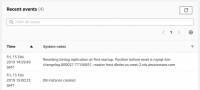
Since we wanted to avoid downtime, it is out of question to pause the application for the time it would take to backup 100GB of data. The solution was to take a snapshot and use it to provision a temporary Amazon Aurora MySQL 5.6 cluster of one node. As part of the creation process, the events tab of the AWS console will show the binary log file and position consistent with the snapshot, it looks like this:

Consistent snapshot replication coordinates

Consistent snapshot replication coordinates

From there, the temporary cluster is idle so it is easy to back it up with mysqldump. Since our dataset is large we considered the use of MyDumper but the added complexity was not worthwhile for a one time operation. The dump of a large database can take many hours. Essentially we performed:

mysqldump -h entrypoint-temporary-cluster -u awsrootuser -pxxxx 
 --no-data --single-transaction -R -E -B db1 db2 db3 > schema.sql
mysqldump -h entrypoint-temporary-cluster -nt --single-transaction 
 -u awsrootuser -pxxxx -B db1 db2 db3 | gzip -1 > dump.sql.gz
pt-show-grants -h entrypoint-temporary-cluster -u awsrootuser -pxxxx > grants.sql

The schema consist of three databases: db1, db2 and db3.  We have not included the mysql schema because it will cause issues with the new 5.7 instance. You’ll see why we dumped the schema and the data separately in the next section.

Restore to an empty Amazon Aurora MySQL 5.7 cluster

With our backup done, we are ready to spin up a brand new Amazon Aurora MySQL 5.7 cluster and restore the backup. Make sure the new Amazon Aurora MySQL 5.7 cluster is in a subnet with access to the Amazon Aurora MySQL 5.6 production cluster. In our schema, there a few very large tables with a significant number of secondary keys. To speed up the restore, we removed the secondary indexes of these tables from the schema.sql file and created a restore-indexes.sql file with the list of alter table statements needed to recreate them. Then we restored the data using these steps:

cat grants.sql | mysql -h entrypoint-new-aurora-57 -u awsroot -pxxxx
cat schema-modified.sql | mysql -h entrypoint-new-aurora-57 -u awsroot -pxxxx
zcat dump.sql.gz | mysql -h entrypoint-new-aurora-57 -u awsroot -pxxxx
cat restore-indexes.sql | mysql -h entrypoint-new-aurora-57 -u awsroot -pxxxx

Configure replication

At this point, we have a new Amazon Aurora MySQL 5.7 cluster provisioned with a dataset at a known replication coordinates from the Amazon Aurora MySQL 5.6 production cluster.  It is now very easy to setup replication. First we need to create a replication user in the Amazon Aurora MySQL 5.6 production cluster:

GRANT REPLICATION CLIENT, REPLICATION SLAVE ON *.* TO 'repl_user'@'%' identified by 'agoodpassword';

Then, in the new Amazon Aurora MySQL 5.7 cluster, you configure replication and start it by:

CALL mysql.rds_set_external_master ('mydbcluster.cluster-123456789012.us-east-1.rds.amazonaws.com', 3306,
  'repl_user', 'agoodpassword', 'mysql-bin-changelog.000018', 65932380, 0);
CALL mysql.rds_start_replication;

The endpoint mydbcluster.cluster-123456789012.us-east-1.rds.amazonaws.com points to the Amazon Aurora MySQL 5.6 production cluster.

Now, if everything went well, the new Amazon Aurora MySQL 5.7 cluster will be actively syncing with its master, the current Amazon Aurora MySQL 5.6 production cluster. This process can take a significant amount of time depending on the write load and the type of instance used for the new cluster. You can monitor the progress with the show slave statusG command, the Seconds_Behind_Master will tell you how far behind in seconds the new cluster is compared to the old one.  It is not a measurement of how long it will take to resync.

You can also monitor throughput using the AWS console. In this screenshot you can see the replication speeding up over time before it peaks when it is completed.

Replication speed

Test with Amazon Aurora MySQL 5.7

At this point, we have an Amazon Aurora MySQL 5.7 cluster in sync with the production Amazon Aurora MySQL 5.6 cluster. Before transferring the production load to the new cluster, you need to test your application with MySQL 5.7. The easiest way is to snapshot the new Amazon Aurora MySQL 5.7 cluster and, using the snapshot, provision a staging Amazon Aurora MySQL 5.7 cluster. Test your application against the staging cluster and, once tested, destroy the staging cluster and any unneeded snapshots.

Switch production to the Amazon Aurora MySQL 5.7 cluster

Now that you have tested your application with the staging cluster and are satisfied how it behaves with Amazon Aurora MySQL 5.7, the very last step is to migrate the production load. Here are the last steps you need to follow:

  1. Make sure the Amazon Aurora MySQL 5.7 cluster is still in sync with the Amazon Aurora MySQL 5.6 cluster
  2. Stop the application
  3. Validate the Show master status; of the 5.6 cluster is no longer moving
  4. Validate from the Show slave statusG in the 5.7 cluster the Master_Log_File and Exec_Master_Log_Pos match the output of the “Show master status;” from the 5.6 cluster
  5. Stop the slave in the 5.7 cluster with CALL mysql.rds_stop_replication;
  6. Reset the slave in the 5.7 cluster with CALL mysql.rds_reset_external_master;
  7. Reconfigure the application to use the 5.7 cluster endpoint
  8. Start the application

The application is down from steps 2 to 8.  Although that might appear to be a long time, these steps can easily be executed within a few minutes.

Summary

So, in summary, although RDS Aurora doesn’t support an in place upgrade between Amazon Aurora MySQL 5.6 and 5.7, there is a possible migration path, minimizing downtime.  In our case, we were able to limit the downtime to only a few minutes.

Co-Author: Jacques Fu, Fattmerchant


Jacques is CTO and co-founder at the fintech startup Fattmerchant, author of Time Hacks, and co-founder of the Orlando Devs, the largest developer meetup in Orlando. He has a passion for building products, bringing them to market, and scaling them.

Upcoming Webinar Thurs 3/7: Enhancing MySQL Security

Enhancing MySQL Security Webinar

Enhancing MySQL Security WebinarJoin Percona Support Engineer, Vinicius Grippa, as he presents his talk Enhancing MySQL Security on Thursday, March 7th, 2019 at 7:00 AM PST (UTC-8) / 10:00 AM EST (UTC-5).

Register Now

Security is always a challenge when it comes to data. What’s more, regulations like GDPR add a whole new layer on top of it, with rules more and more restrictive to access and manipulate data. Join us in this presentation to check security best practices, as well as traditional and new features available for MySQL including features coming with the new MySQL 8.

In this talk, DBA’s and sysadmins will walk through the security features available on the OS and MySQL. For instance, these features include:

– SO security
– SSL
– ACL
– TDE
– Audit Plugin
– MySQL 8 features (undo, redo and binlog encryption)
– New caching_sha2_password
– Roles
– Password Management
– FIPS mode

In order to learn more register for this webinar on Enhancing MySQL Security.