Compression Options in MySQL (Part 2)

Swiss cheese File system

In one of my previous posts, I started a series on data compression options with MySQL. The first post focused on the more traditional compression options like InnoDB Barracuda page compression and MyISAM packing. With this second part, I’ll discuss a newer compression option, InnoDB transparent page compression with punch holes available since 5.7. First, I’ll describe the transparent page compression method and how it works. Then I’ll present similar results as in the first post.

InnoDB transparent page compression

Before we can discuss transparent page compression, we must understand how InnoDB accesses its data pages. To access an InnoDB page, you need to know the tablespace (the file) and the offset of the page within the tablespace file. The offset is the tough part with data compression. If you just compress pages and concatenate them one after the other, the offsets will no longer be at known intervals. InnoDB Barracuda page compression solves the problem by asking the DBA to guess the compression ratio of the pages with the compressed block size setting. For example, you have to tell InnoDB to use a disk block size of 8KB if you think the compression ratio will be around 2. Transparent page compression uses another approach, sparse files.

Sparse files 101

A sparse file is a file with holes in it. Even though a sparse file may be very large, if there are a lot of holes in it, it may end up using a small amount of storage. On almost every Linux system, the /var/log/lastlog file is sparse:

yves@ThinkPad-P51:/var/log$ ls -lah lastlog
-rw-rw-r-- 1 root utmp 18M jan 5 16:09 lastlog
yves@ThinkPad-P51:/var/log$ du -hs lastlog
56K lastlog

While the ls command reports an apparent size of 18MB, the du command tells us the file actually uses only 56KB. Most of the space in the file is actually unallocated. When you access a sparse file, the filesystem has to map the actual physical offsets in the file with the logical offsets seen by the application. A logical offset is no longer directly the number of bytes since the beginning of the file.

Now that we understand a bit what sparse files are, let’s talk about the punch hole aspect. When you write something to disk, you can use the fallocate call to free up, punch, part of it. The freed/punched portion is thus a hole in the file, and the filesystem can later reuse the hole to store something else. Let’s follow a simplified view of the steps required to write a transparently compressed InnoDB page.

InnoDB using sparse files

Figure 1: InnoDB Transparent page compression

In figure 1, an in memory 16KB InnoDB page with 14KB of data is going to be written to disk. As part of the write process, the data is compressed to 6KB and the page is written to the disk. Once written, InnoDB uses the fallocate call to release the 10KB of unused space. Since only full blocks are release,  only 8KB is really freed. The remaining space unreleased space (2KB) is just zeroed. The freed space will be reused, either for the same file or by another one. For simplicity, let’s assume the space is reused by the same InnoDB file.

Figure 2: File system layout

If there is no immediate reuse, a portion of the InnoDB file will look like the top file layout of figure 2. The pages (numbers) are still sequentially laid out but there are holes in between. As the file system gets full, it will start to reuse the freed space so eventually, the file layout will look like the bottom one. If you notice, in the bottom layout, the pages are no longer in sequential order. There are consequences to that: the notion of disk sequential access is gone. The most stunning example is a simple file copy on a spinning device. While copying a 1GB regular file may take only 30 seconds, the copy of a 1GB sparse file can take much longer, up to 30 minutes in the worst cases. The impact on physical backup tools, like Percona Xtrabackup, are thus important. Normally physical backups are much faster than logical ones (ex: mysqldump), but with sparse files, it may no longer be true.

MySQL impacts

There are also consequences of the use of sparse files on the design of a MySQL database server. The added random operations increase the importance of using SSD/Flash based storage. Also some settings must be considered with a different perspective:

  • innodb_flush_neighbors should be 0 since 1 is a cheat geared toward sequential operations
  • innodb_read_ahead_threshold, normally set to 56, this means when 56 pages of an extent have been scanned, the next extent is read sequentially ahead of time. To be really useful, the next extent should be read before the remaining 8 pages of the current extent are read. Since sequential operations are slower, maybe this value should be lowered a little. The drawback is an increased possibility of a read ahead without use.
  • innodb_random_read_ahead is a wilder setting, it would be a good idea to experiment with this for your workload

There are likely to be other affected settings.

Review of the test procedure

Just to refresh memories, I am using two datasets for the basic benchmarks. The first, Wikipedia, consists in about 1B rows of Wikipedia access logs. It is moderately compressible. The second dataset, o1543, is from the defunct Percona cloud tool project. It has only 77M rows but they are much wider with 134 columns. The o1543 dataset is highly compressible.

On these two datasets, the following steps were executed:

  1. insert the rows: record time, final size and amount of data written
  2. large range select, record the time
  3. 20k updates, record the time to and total bytes written

Results

Final sizes

Figure 3, Innodb transparent page compression final sizes

One of the most critical metrics with compression is the final dataset size, as shown in figure 3. The possibility to use larger InnoDB pages is a big thing with transparent page compression. Larger pages allow for more repetitive patterns to be present within a page, and that improves the compression ratio. Results using page sizes of 16KB, 32KB and 64KB are shown. The uncompressed results are used as references, transparent compression (TC) using Lz4 and Zlib are the actual compressed datasets. First, we see that larger page sizes barely affect the size of the uncompressed dataset (I16, I32 and I64). Since the datasets were inserted in primary key order, the only possible impact is the filling factor of the pages. When InnoDB fills a page in PK order, even when the innodb_fill_factor is set to 100, it always leaves 1KB free per 16KB. With an amount of free space that scales with the page size, the final size doesn’t change much.

The impacts of larger page sizes on the compression ratio are important. The most drastic example is with the o1543 dataset and Zlib compression. While with a 16KB page, the compression ratio was already decent, at 3.65, it grows to an amazing 8.7 (I16/I64TCZlib) with pages of 64KB. Larger page sizes have also a positive impact on the compression ratio of the Wikipedia dataset. The original compression ratio with Zlib and 16KB pages is 2.4 and it grows to 3.4 with 64KB pages. Datasets compressed with Lz4 behave similarly to the Zlib ones but the compression ratio are slightly lower.

Overall, the I64TCZlib results for the Wikipedia dataset is the most compressed form we have so far. For the o1543 dataset, the MyISAMPacked compressed size is still slightly smaller but is read-only.

Insertion time

Figure 4, InnoDB transparent page compression insert times

We normally expect compression to add an overhead but here, the insertion speed improves with larger page sizes (figure 4). The reason is likely to be because we are using spinning disks. Spinning disks have a high latency so doing larger IO operations helps. The time overhead of compression with transparent page compression hovers between 10 and 17%. That’s much less than 60% overhead we observed for the Barracuda table compression in the previous post for the Wikipedia dataset (InnoDBCmp8k/InnoDB). We can conclude the insert rates, when inserts are in PK order, are not much affected by transparent page compression. If you are mostly inserting data, it is a nice win.

Data written by inserts

Figure 5, total amount of data written during the inserts

The amount of data written is not much affected by the transparent compression and the larger page sizes (figure 5) . That’s reasonable as many of the writes are not compressed, only the final write to the tablespace is. Neither the writes to the double write buffer, or to the InnoDB log files, or for the tablespace pre-allocation, are compressed. The differences we see are essentially the same as the ones for the final sizes. Only the uncompressed results do not fit that view but these are rather small deviations.

Range selects

Figure 6, time to complete a long range scan

The range select benchmarks are really a means of testing the decompression overhead. As you notice in figure 6, the time variations are not large. For the Wikipedia dataset, the faster range select is I64TCLz4, and it completed in 788 seconds. That’s almost two minutes slower than the faster results using InnoDB Barracuda compression (block_size=4KB). How can we explain such results? If the freed space is reused, transparent compression causes sequential operations to become random ones. The time should increase.  Without space reuse, the storage layer will merge many small reads into a sequential one, and then discard the holes.  Effectively, the disk will read the same amount of data, compressed or not. The only difference will come from decompression.  Lz4 is extremely fast while Zlib is slower.

Going back to the Wikipedia dataset, it took the exact same time, 830s, for I16, I16TCLz4  and I32TCLz4. That seems to indicate there was no space reuse.  With the xfs xfs_bmap tool on a TC compressed file, I listed the blocks used. Here is the command I used and the first lines of the output (with blocks of 512 bytes):

root@LabPS57kvm_1:/tmp# xfs_bmap /var/lib/mysql/test/query_class_metrics.ibd | more
/var/lib/mysql/test/query_class_metrics.ibd:
0: [0..31]: 1013168..1013199
1: [32..39]: 1014544..1014551
2: [40..63]: hole
3: [64..71]: 1016976..1016983
4: [72..95]: hole
5: [96..103]: 1017008..1017015
6: [104..127]: hole
7: [128..135]: 1016880..1016887
8: [136..159]: hole
9: [160..167]: 1016912..1016919
10: [168..191]: hole
...

We have the list:

  • 0..31: 16 KB tablespace header, apparently not compressed
  • 32..39: 4KB TC compressed page, 8 sectors of compressed data
  • 40..63: 12KB hole (24 sectors)
  • …and so on

So the layout actually looks indeed like the filesystem with no reuse case (top layout) of figure 2. When InnoDB extends the tablespace, it of course proceeds by entire pages. The filesystem will try, as much as possible, to allocate continuous blocks. Initially, the tablespace increases one page at a time but rapidly it grows by extent of 64 pages. The space reuse will start only when there are no more continuous areas large enough to satisfy the allocation requests. Until then, the filesystem still performs mostly  sequential operations. The performance characteristics will thus change once the freed blocks start to be reused. On a smaller server, I continued to insert data well after the filesystem would have been full without the holes. The insertion rate fell by about half but the read performance appeared unchanged.

The times of the range selects for the o1543 dataset are more predictable. In all cases, larger pages increase performance. That kind of makes sense – InnoDB needs less IOPS. With Lz4, InnoDB spends less time to decompress the pages than it would need to read the complete uncompressed pages. The opposite is also true for Zlib. The Lz4 results are the fastest, Zlib the slowest, and in between we have the uncompressed results.

20k updates time

Figure 7, time needed to perform 20k updates

Intuitively, I was expecting the larger pages to slow down the updates. Similarly, I was also expecting Lz4 compressed pages to be slower than uncompressed pages, but faster than the ones compressed with Zlib. The above figure shows the times to perform approximately 20k single row updates for both datasets. We performed the updates to the Wikipedia dataset in small separate transactions, while we used a single large update statement for the o1543 dataset.

While the compression algorithm assumption appears to hold true, the one for the page sizes is plainly wrong. Of course, the storage consists of spinning disks so the latency of random IO dominates. The important factor becomes the number of levels in the b-tree of the table. In the root node of the b-tree and all intermediate nodes, bigger pages mean more pointers to the next level. More pointers causes a bigger fan-out  –ratio of nodes between levels – and fewer levels. Bigger pages also cause fewer leaf level pages which in turn require less upper level node pages.

Let’s dive a bit more into this topic. The Wikipedia dataset table has an int unsigned primary key. Considering InnoDB always leaves 1KB free in a page and, along with the primary key, each entry in a node (non-leaf) has an extra 9 bytes for the pointer to the next level page. Let’s do some math:

  • Total number of pages with 16KB pages = 112.6GB / (15KB) = 7871311 pages
  • Max number of rows in the non-leaf pages for 16KB pages and an int PK = (16 * 1024)/(4 (int PK) + 9 (ptr)) = 1260 rows/pages
  • Minimum number of pages in the first level above the leaf = 7871311 / 1260 = 6247 pages
  • Minimum number of pages at the next level = 6247 / 1260 = 5 pages
  • Root page = 1

Of course, our calculations are an approximation. With a 16KB page size, there are three levels above the leaves for a total of 6253 pages and a size of 98MB. It thus requires 6253 IOPS to warm up the buffer pool with the all nodes. A SATA 7200 rpm disk delivers at best 120 IOPS (one per rotation) so that’s about 51 second. Now, let’s redo the same calculations but with a page size of 32KB:

  • Total number of pages with 32KB pages = 110.7GB / (31KB) = 3744431 pages
  • Max number of rows in the non-leaf pages for 32KB pages and an int PK = (32 * 1024)/(4 (int PK) + 9 (ptr)) = 2520 rows/pages
  • Minimum number of pages in the first level above the leaf = 3744431 / 2520 = 1486 pages
  • Root page = 1

Using 32KB pages, we have one level less and only 1487 node pages for a combined size of 47MB. To warm up, the buffer pool we have to load at least the node pages, an operation requiring only a quarter of the IOPS compared to when 16KB pages were used. That’s where most of the performance gains come from. The reduced number of IOPS more than compensates for the longer time to read a large page.  Again, in this setup, we used spinning disks.

Bytes written per update

Figure 8, average bytes written per update

Now, the last set of results concerns the number of bytes written per update statement (figure 8). There is a big price to pay when you want to use larger InnoDB pages, the write amplification is huge. The number of bytes approximately scales roughly with the page size. The worse case is the I64 result, about 192KB written for a single row update of an integer field (Wikipedia). If your database workload includes a large number of small single row updates, you should avoid expensive flash devices with 64KB InnoDB pages as you’ll burn your devices rapidly.

Operational considerations for larger InnoDB pages and TC

When is it good idea to use transparent compression? When should you use a larger InnoDB page size? One valid use case is a database storing large quantities of operational metrics, like the o1543 dataset.  The compression ratio will be fantastic and the performance penalty limited, at least until the filesystem starts reusing the holes.

If you collect data from a large number of devices and you are likely struggling with TBs of highly compressible data, transparent compression might be an interesting option. The only issue I see, but it is a major one, is how to backup large sparse files. InnoDB transparent page compression with punch holes is an interesting solution but, unless I am missing something, it has a somewhat limited scope. There are other compression options with similar compression ratios and less drawbacks.

In this post we explored a feature available since MySQL 5.7, InnoDB transparent compression with punch holes. Performance-wise, we have an interesting solution which offers excellent compression ratio, especially when larger page sizes are used. The transparent compression with punch holes technique suffers from its foundations, sparse files. Backing up very large sparse files is a slow and IO intensive process. Instead of performing large sequential IO operations, the backup process will require millions of small random IO operations.

So far we have discussed the traditional approaches to compression in MySQL (previous post) and Innodb transparent page compression. The next post of the series on data compression with MySQL will introduce the ZFS filesystem. ZFS externalizes the compression to the filesystem in a way that is pretty similar to InnoDB transparent page compression, but the ZFS b-tree file structure removes the inconvenience of sparse files.

Stay tuned, more results are coming.

Debugging MariaDB Galera Cluster SST Problems – A Tale of a Funny Experience

MariaDB galera cluster starting time

MariaDB galera cluster starting timeRecently, I had to work on an emergency for a customer who was having a problem restarting a MariaDB Galera Cluster. After a failure in the cluster they decided to restart the cluster entirely following the right path: bootstrapping the first node, and then adding the rest of the members, one by one. Everything went fine until one of the nodes rejected the request to join the cluster.

Given this problem, the customer decided to ask us to help with the problematic node because none of the tests they did worked, and the same symptom repeated over and over: SST started, copied few gigs of data and then it just hanged (apparently) while the node remained out of the cluster.

Identifying the issue…

Once onboard with the issue, initially I just checked that the cluster was trying a SST: given the whole dataset was about 31GB I decided to go directly to a healthy solution: to clean up the whole datadir and start afresh. No luck at all, the symptom was exactly the same no matter what I tried:

After reviewing the logs I noticed few strange things. In the joiner:

2019-01-29 16:14:41 139996474869504 [Warning] WSREP: Failed to prepare for incremental state transfer: Local state UUID (00000000-0000-0000-0000-000000000000) does not match group state UUID (18153472-f958-11e8-ba63-fae8ac6c22f8): 1 (Operation not permitted)
at galera/src/replicator_str.cpp:prepare_for_IST():482. IST will be unavailable.
2019-01-29 16:14:41 139996262553344 [Note] WSREP: Member 3.0 (node1) requested state transfer from '*any*'. Selected 0.0 (node3)(SYNCED) as donor.
2019-01-29 16:14:41 139996262553344 [Note] WSREP: Shifting PRIMARY -> JOINER (TO: 4902465)
2019-01-29 16:14:41 139996474869504 [Note] WSREP: Requesting state transfer: success, donor: 0
2019-01-29 16:14:41 139996474869504 [Note] WSREP: GCache history reset: 00000000-0000-0000-0000-000000000000:0 -> 18153472-f958-11e8-ba63-fae8ac6c22f8:4902465
2019-01-29 16:14:42 139996270946048 [Note] WSREP: (9864c6ca, 'tcp://0.0.0.0:4567') connection to peer 9864c6ca with addr tcp://192.168.12.21:4567 timed out, no messages seen in PT3S
2019-01-29 16:14:42 139996270946048 [Note] WSREP: (9864c6ca, 'tcp://0.0.0.0:4567') turning message relay requesting off
2019-01-29 16:16:08 139996254160640 [ERROR] WSREP: Process was aborted.
2019-01-29 16:16:08 139996254160640 [ERROR] WSREP: Process completed with error: wsrep_sst_xtrabackup-v2 --role 'joiner' --address '192.168.12.21' --datadir '/var/lib/mysql/' --parent '8725' --binlog '/var/log/mysql/mariadb-bin' --binlog-index '/var/log/mysql/mariadb-bin.index': 2 (No such file or directory)

In the donor (output has been a obfuscated to avoid sharing private info and the times are not matching deliberately):

Jan 29 18:08:22 node3 -innobackupex-backup: 190129 18:08:22 >> log scanned up to (203524317205)
Jan 29 18:08:23 node3 -innobackupex-backup: 190129 18:08:23 >> log scanned up to (203524318337)
Jan 29 18:08:24 node3 -innobackupex-backup: 190129 18:08:24 >> log scanned up to (203524320436)
Jan 29 18:08:25 node3 -innobackupex-backup: 190129 18:08:25 >> log scanned up to (203524322720)
Jan 29 18:08:25 node3 nrpe[25546]: Error: Request packet type/version was invalid!
Jan 29 18:08:25 node3 nrpe[25546]: Client request was invalid, bailing out...
Jan 29 18:08:26 node3 -innobackupex-backup: 190129 18:08:26 >> log scanned up to (203524322720)
Jan 29 18:08:27 node3 -innobackupex-backup: 190129 18:08:27 >> log scanned up to (203524323538)
Jan 29 18:08:28 node3 -innobackupex-backup: 190129 18:08:28 >> log scanned up to (203524324667)
Jan 29 18:08:29 node3 -innobackupex-backup: 190129 18:08:29 >> log scanned up to (203524325358)
Jan 29 18:08:30 node3 -wsrep-sst-donor: 2019/01/29 18:08:30 socat[22843] E write(6, 0x1579220, 8192): Broken pipe
Jan 29 18:08:30 node3 -innobackupex-backup: innobackupex: Error writing file 'UNOPENED' (Errcode: 32 - Broken pipe)
Jan 29 18:08:30 node3 -innobackupex-backup: xb_stream_write_data() failed.
Jan 29 18:08:30 node3 -innobackupex-backup: innobackupex: Error writing file 'UNOPENED' (Errcode: 32 - Broken pipe)
Jan 29 18:08:30 node3 -innobackupex-backup: [01] xtrabackup: Error: xtrabackup_copy_datafile() failed.
Jan 29 18:08:30 node3 -innobackupex-backup: [01] xtrabackup: Error: failed to copy datafile.
Jan 29 18:08:30 node3 mysqld[27345]: 2019-01-29 18:08:30 140562136139520 [Warning] Aborted connection 422963 to db: 'unconnected' user: 'sstuser' host: 'localhost' (Got an error reading communication packets)
Jan 29 18:08:30 node3 -wsrep-sst-donor: innobackupex finished with error: 1. Check /var/lib/mysql//innobackup.backup.log
Jan 29 18:08:30 node3 -wsrep-sst-donor: Cleanup after exit with status:22

So SST starts correctly and then failed. I tried forcing different donors, checked firewall rules, etc. Nothing.

Additionally I noticed that the process was starting over and over, while monitoring,  .ssh folder was growing up to certain size (something around 7GB) and then would start over. The logs kept showing the same messages, the init script failed with an error but the process kept running either until I executed service mysql stop or kill -9 to all processes. It was getting stranger every minute.

At this point I was totally lost, scratching my head looking for solutions. More strange still was that trying a manual SST using netcat worked perfectly! So it was definitely a problem with the init script. Systemd journal was not providing any insight…

And then…

MariaDB Cluster dies in the SST process after 90 seconds

Suddenly I noticed that the failure was happening roughly 90 seconds after the start. A short googling later—doing more specific search—I found this page:
https://mariadb.com/kb/en/library/systemd/#ssts-and-systemd which explained precisely my problem.

The MariaDB init script has changed its timeout from 900 seconds to 90 while MySQL Community and Percona Server has this value set to 15 mins. Also it seems that this change has caused some major issues with nodes crashing as documented in MDEV-15607 — the bug is reported as fixed but we still can see timeout problems.

I observed that in case of failure, systemd was killing the mysqld process but not stopping the service. This results in an infinite SST loop that only stops when the service is killed or stopped via systemd command.

The fix was super easy, I just needed to create a file to be used by systemd that sets the timeout to a more useful value as follows:

sudo tee /etc/systemd/system/mariadb.service.d/timeoutstartsec.conf <<EOF
[Service]
TimeoutStartSec=900
EOF
sudo systemctl daemon-reload

As you may notice I set the timeout to 15 minutes but I could set it to any time. That was it, the next SST will have plenty of time to finish. Reference to this change is very well documented here

On reflection…

One could argue about this change, and I’m still having some internal discussions about it. In my opinion, a 90 seconds timeout is too short for a Galera cluster. It is very likely that almost any cluster will reach that timeout during SST. Even a regular MySQL server that suffers a crash with a high proportion of dirty pages or many operations to rollback, 90 seconds doesn’t seem to be an feasible time for crash recovery. Why the developers changed it to such a short timeout I have no idea. Luckily, it is very easy to fix now I know the reason.


Photo by Tim Gouw on Unsplash

plprofiler – Getting a Handy Tool for Profiling Your PL/pgSQL Code

plprofiler postgres performance tool

PostgreSQL is emerging as the standard destination for database migrations from proprietary databases. As a consequence, there is an increase in demand for database side code migration and associated performance troubleshooting. One might be able to trace the latency to a plsql function, but explaining what happens within a function could be a difficult question. Things get messier when you know the function call is taking time, but within that function there are calls to other functions as part of its body. It is a very challenging question to identify which line inside a function—or block of code—is causing the slowness. In order to answer such questions, we need to know how much time an execution spends on each line or block of code. The plprofiler project provides great tooling and extensions to address such questions.

Demonstration of plprofiler using an example

The plprofiler source contains a sample for testing plprofiler. This sample serves two purposes. It can be used for testing the configuration of plprofiler, and it is great place to see how to do the profiling of a nested function call. Files related to this can be located inside the “examples” directory. Don’t worry—I’ll be running through the installation of plprofiler later in this article.

$ cd examples/

The example expects you to create a database with name “pgbench_plprofiler”

postgres=# CREATE DATABASE pgbench_plprofiler;
CREATE DATABASE

The project provides a shell script along with a source tree to test plprofiler functionality. So testing is just a matter of running the shell script.

$ ./prepdb.sh
dropping old tables...
....

Running session level profiling

This profiling uses session level local-data. By default the plprofiler extension collects runtime data in per-backend hashtables (in-memory). This data is only accessible in the current session, and is lost when the session ends or the hash tables are explicitly reset. plprofiler’s run command will execute the plsql code and capture the profile information.

This is illustrated by below example,

$ plprofiler run --command "SELECT tpcb(1, 2, 3, -42)" -d pgbench_plprofiler --output tpcb-test1.html
SELECT tpcb(1, 2, 3, -42)
-- row1:
tpcb: -42
----
(1 rows)
SELECT 1 (0.073 seconds)

What happens during above plprofiler command run can be summarised in 3 steps:

  1. A function call with four parameters “SELECT tpcb(1, 2, 3, -42)” is presented to the plprofiler tool for execution.
  2. plprofiler establishes a connection to PostgreSQL and executes the function
  3. The tool collects the profile information captured in the local-data hash tables and generates an HTML report “tpcb-test1.html”

Global profiling

As mentioned previously, this method is useful if we want to profile the function executions in other sessions or on the entire database. During global profiling, data is captured into a shared-data hash table which is accessible for all sessions in the database. The plprofiler extension periodically copies the local-data from the individual sessions into shared hash tables, to make the statistics available to other sessions. See the

plprofiler monitor

  command, below, for details. This data still relies on the local database system catalog to resolve Oid values into object definitions.

In this example, the plprofiler tool will be running in monitor mode for a duration of 60 seconds. Every 10 seconds, the tool copies data from local-data to shared-data.

$ plprofiler monitor --interval=10 --duration=60 -d pgbench_plprofiler
monitoring for 60 seconds ...
done.

For testing purposes you can start executing a few functions at the same time.

Once the data is captured into shared-data, we can generate a report. For example:

$ plprofiler report --from-shared --title=MultipgMax --output=MultipgMax.html -d pgbench_plprofiler

The data in shared-data will be retained until it’s explicitly cleared using the

plprofiler reset

  command

$ plprofiler reset

If there is no profile data present in the shared hash tables, execution of the report will result in error message.

$ plprofiler report --from-shared --title=MultipgMax --output=MultipgMax.html
Traceback (most recent call last):
File "/usr/bin/plprofiler", line 11, in <module>
load_entry_point('plprofiler==4.dev0', 'console_scripts', 'plprofiler')()
File "/usr/lib/python2.7/site-packages/plprofiler-4.dev0-py2.7.egg/plprofiler/plprofiler_tool.py", line 67, in main
return report_command(sys.argv[2:])
File "/usr/lib/python2.7/site-packages/plprofiler-4.dev0-py2.7.egg/plprofiler/plprofiler_tool.py", line 493, in report_command
report_data = plp.get_shared_report_data(opt_name, opt_top, args)
File "/usr/lib/python2.7/site-packages/plprofiler-4.dev0-py2.7.egg/plprofiler/plprofiler.py", line 555, in get_shared_report_data
raise Exception("No profiling data found")
Exception: No profiling data found

Report on profile information

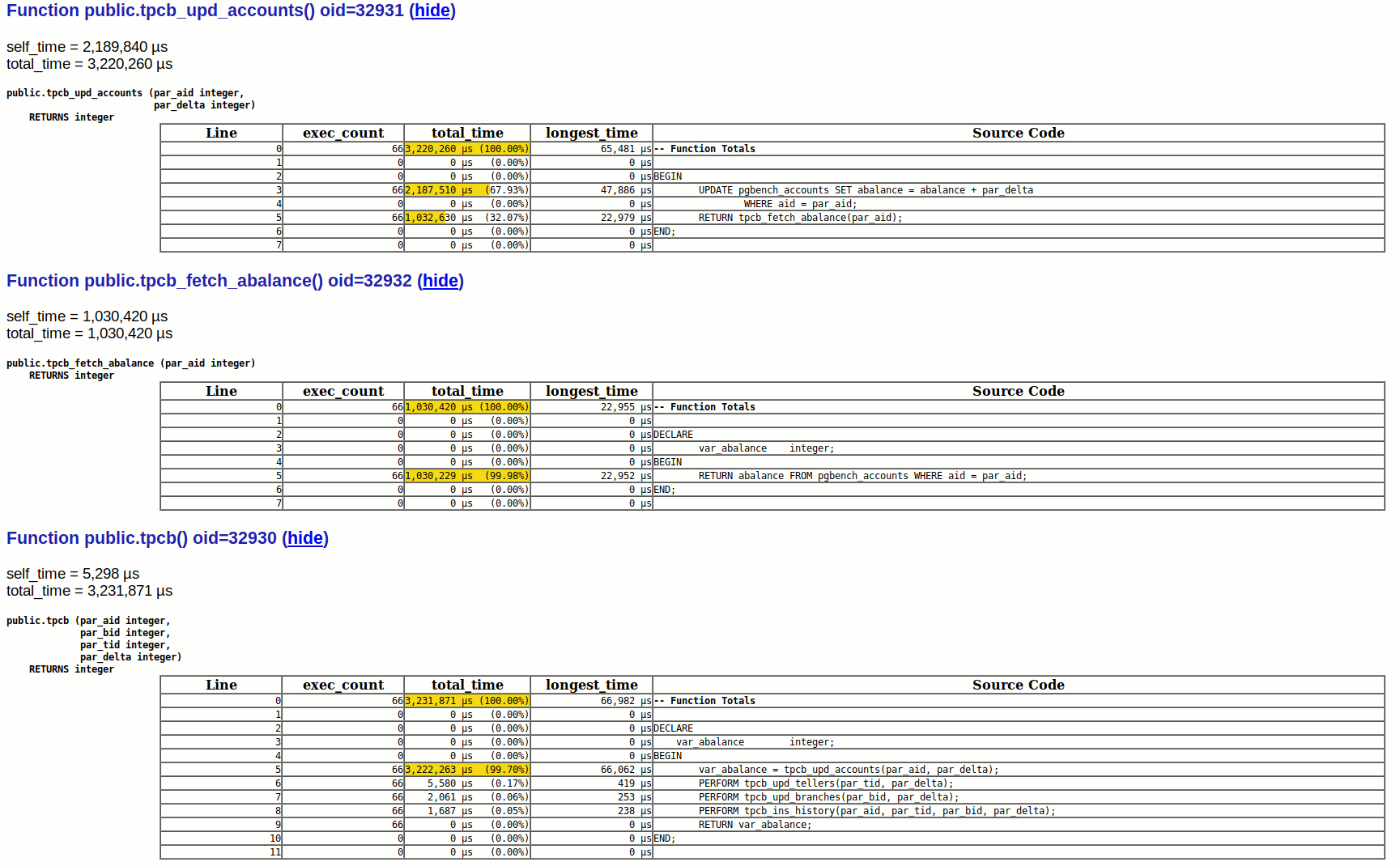
The HTML report generated by plprofiler is a self-contained HTML document and it gives detailed information about the PL/pgSQL function execution. There will be a clickable FlameGraph at the top of the report with details about functions in the profile. The plprofiler FlameGraph is based on the actual Wall-Clock time spent in the PL/pgSQL functions. By default, plprofiler provides details on the top ten functions, based on their self_time (total_time – children_time).

This section of the report is followed by tabular representation of function calls. For example:

This gives a lot of detailed information such as execution counts and time spend against each line of code.

Binary Packages

Binary distributions of plprofiler are not common. However the BigSQL project provides plprofiler packages as an easy to use bundle. Such ready-to-use packages are one of the reasons for BigSQL to remain as one of the most developer friendly PostgreSQL distributions. The first screen of Package manager installation of BigSQL provided me with the information I am looking for:


Appears that there was a recent release of BigSQL packages and plprofiler is an updated package within that.

Installation and configuration is made simple:

$ ./pgc install plprofiler-pg11
['plprofiler-pg11']
File is already downloaded.
Unpacking plprofiler-pg11-3.3-1-linux64.tar.bz2
install-plprofiler-pg11...
Updating postgresql.conf file:
old: #shared_preload_libraries = '' # (change requires restart)
new: shared_preload_libraries = 'plprofiler'

As we can see, even PostgreSQL parameters are updated to have plprofiler as a

shared_preload_library

 .  If need to use plprofiler for investigating code, these binary packages from the BigSQL project are my first preference because everything is ready to use. Definitely, this is developer-friendly.

Creation of extension and configuring the plprofiler tool

At the database level, we should create the plprofiler extension to profile the function execution. This step needs to be performed in both cases, whether we want global profiling where share_preload_libraries are set, or at session level where that is not required

postgres=# create extension plprofiler;
CREATE EXTENSION

plprofiler is not just an extension, but comes with tooling to invoke profiling or to generate reports. These scripts are primarily coded in Python and uses psycopg2 to connect to PostgreSQL. The python code is located inside the “python-plprofiler” directory of the source tree. There are a few perl dependencies too which will be resolved as part of installation

sudo yum install python-setuptools.noarch
sudo yum install python-psycopg2
cd python-plprofiler/
sudo python ./setup.py install

Building from source

If you already have a PostgreSQL instance running using binaries from PGDG repository OR you want to wet your hands by building everything from source, then installation needs a different approach. I have PostgreSQL 11 already running on the system. The first step is to get the corresponding development packages which have all the header files and libraries to support a build from source. Obviously this is the thorough way of getting plprofiler working.

$ sudo yum install postgresql11-devel

We need to have build tools, and since the core of plprofiler is C code, we have to install a C compiler and make utility.

$ sudo yum install gcc make

Preferably, we should build plprofiler using the same OS user that runs PostgreSQL server, which is “postgres” in most environments. Please make sure that all PostgreSQL binaries are available in the path and that you are able to execute the pg_config, which lists out build related information:

$ pg_config
BINDIR = /usr/pgsql-11/bin
..
INCLUDEDIR = /usr/pgsql-11/include
PKGINCLUDEDIR = /usr/pgsql-11/include
INCLUDEDIR-SERVER = /usr/pgsql-11/include/server
LIBDIR = /usr/pgsql-11/lib
PKGLIBDIR = /usr/pgsql-11/lib
LOCALEDIR = /usr/pgsql-11/share/locale
MANDIR = /usr/pgsql-11/share/man
SHAREDIR = /usr/pgsql-11/share
SYSCONFDIR = /etc/sysconfig/pgsql
PGXS = /usr/pgsql-11/lib/pgxs/src/makefiles/pgxs.mk
CONFIGURE = '--enable-rpath' '--prefix=/usr/pgsql-11' '--includedir=/usr/pgsql-11/include' '--mandir=/usr/pgsql-11/share/man' '--datadir=/usr/pgsql-11/share' '--with-icu' 'CLANG=/opt/rh/llvm-toolset-7/root/usr/bin/clang' 'LLVM_CONFIG=/usr/lib64/llvm5.0/bin/llvm-config' '--with-llvm' '--with-perl' '--with-python' '--with-tcl' '--with-tclconfig=/usr/lib64' '--with-openssl' '--with-pam' '--with-gssapi' '--with-includes=/usr/include' '--with-libraries=/usr/lib64' '--enable-nls' '--enable-dtrace' '--with-uuid=e2fs' '--with-libxml' '--with-libxslt' '--with-ldap' '--with-selinux' '--with-systemd' '--with-system-tzdata=/usr/share/zoneinfo' '--sysconfdir=/etc/sysconfig/pgsql' '--docdir=/usr/pgsql-11/doc' '--htmldir=/usr/pgsql-11/doc/html' 'CFLAGS=-O2 -g -pipe -Wall -Wp,-D_FORTIFY_SOURCE=2 -fexceptions -fstack-protector-strong --param=ssp-buffer-size=4 -grecord-gcc-switches -m64 -mtune=generic' 'LDFLAGS=-Wl,--as-needed' 'PKG_CONFIG_PATH=:/usr/lib64/pkgconfig:/usr/share/pkgconfig'
CC = gcc
...
VERSION = PostgreSQL 11.1

Now we’re ready to get the source code and build it. You should be able to checkout the git repository for plprofiler.

$ git clone https://github.com/pgcentral/plprofiler.git
Cloning into 'plprofiler'...
...

Building against PostgreSQL 11 binaries from PGDG can be a bit complicated because of th JIT feature. Configuration flag

--with-llvm

  will be enabled. So we may have to have LLVM present in the system as detailed in my previous blog about JIT in PostgreSQL11

Once we’re ready, we can move to the plprofiler directory and build it:

$ cd plprofiler
$ make USE_PGXS=1
--- Output ----
gcc -Wall -Wmissing-prototypes -Wpointer-arith -Wdeclaration-after-statement -Wendif-labels -Wmissing-format-attribute -Wformat-security -fno-strict-aliasing -fwrapv -fexcess-precision=standard -O2 -g -pipe -Wall -Wp,-D_FORTIFY_SOURCE=2 -fexceptions -fstack-protector-strong --param=ssp-buffer-size=4 -grecord-gcc-switches -m64 -mtune=generic -fPIC -I. -I./ -I/usr/pgsql-11/include/server -I/usr/pgsql-11/include/internal -D_GNU_SOURCE -I/usr/include/libxml2 -I/usr/include -c -o plprofiler.o plprofiler.c
gcc -Wall -Wmissing-prototypes -Wpointer-arith -Wdeclaration-after-statement -Wendif-labels -Wmissing-format-attribute -Wformat-security -fno-strict-aliasing -fwrapv -fexcess-precision=standard -O2 -g -pipe -Wall -Wp,-D_FORTIFY_SOURCE=2 -fexceptions -fstack-protector-strong --param=ssp-buffer-size=4 -grecord-gcc-switches -m64 -mtune=generic -fPIC -shared -o plprofiler.so plprofiler.o -L/usr/pgsql-11/lib -Wl,--as-needed -L/usr/lib64/llvm5.0/lib -L/usr/lib64 -Wl,--as-needed -Wl,-rpath,'/usr/pgsql-11/lib',--enable-new-dtags
/opt/rh/llvm-toolset-7/root/usr/bin/clang -Wno-ignored-attributes -fno-strict-aliasing -fwrapv -O2 -I. -I./ -I/usr/pgsql-11/include/server -I/usr/pgsql-11/include/internal -D_GNU_SOURCE -I/usr/include/libxml2 -I/usr/include -flto=thin -emit-llvm -c -o plprofiler.bc plprofiler.c

Now we should be able to install this extension:

$ sudo make USE_PGXS=1 install
--- Output ----
/usr/bin/mkdir -p '/usr/pgsql-11/lib'
/usr/bin/mkdir -p '/usr/pgsql-11/share/extension'
/usr/bin/install -c -m 755 plprofiler.so '/usr/pgsql-11/lib/plprofiler.so'
/usr/bin/install -c -m 644 .//plprofiler.control '/usr/pgsql-11/share/extension/'
/usr/bin/install -c -m 644 .//plprofiler--1.0--2.0.sql .//plprofiler--2.0--3.0.sql .//plprofiler--3.0.sql '/usr/pgsql-11/share/extension/'
/usr/bin/mkdir -p '/usr/pgsql-11/lib/bitcode/plprofiler'
/usr/bin/mkdir -p '/usr/pgsql-11/lib/bitcode'/plprofiler/
/usr/bin/install -c -m 644 plprofiler.bc '/usr/pgsql-11/lib/bitcode'/plprofiler/./

The above command expects all build tools to be in the proper path even with sudo.

Profiling external sessions

To profile a function executed by another session, or all other sessions, we should load the libraries at global level. In production environments, that will be the case. This can be done by adding the extension library to the

shared_preload_libraries

  specification. You won’t need this if you only want to profile functions executed within your session. Session level profiling is generally possible only in Dev/Test environments.

To enable global profiling, verify the current value of

shared_preload_libraries

  and add plprofiler to the list.

postgres=# show shared_preload_libraries ;
shared_preload_libraries
--------------------------
(1 row)
postgres=# alter system set shared_preload_libraries = 'plprofiler';
ALTER SYSTEM
postgres=#

This change requires us to restart the PostgreSQL server

$ sudo systemctl restart postgresql-11

After the restart, it’s a good idea to verify the parameter change

postgres=# show shared_preload_libraries ;
shared_preload_libraries
--------------------------
plprofiler
(1 row)

From this point onwards, the steps are same as those for the binary package setup discussed above.

Summary

plprofiler is a wonderful tool for developers. I keep seeing many users who are in real need of it. Hopefully this blog post will help those who never tried it.

FOSDEM 2019 – Percona Presentations

FOSDEM Paintings

For those not familiar with it, FOSDEM is an amazing, free entry, full on celebration of open source that takes place in Brussels, Belgium every year. This year the event was held over the first weekend of February. Fringe events, such as the Pre-FOSDEM MySQL day hosted by Oracle MySQL, and the community dinner that follows, provide an opportunity to network.

In case you didn’t make it to FOSDEM this year, here are links to Percona’s presentations from the event. Organizers video and share online every talk from every dev room, a phenomenal achievement in itself. All credit to the volunteers who run this show.

Database Dev Room: Hugepages and databases presented by Fernando Laudares Camargos


MySQL, MariaDB and Friends Dev Room: MySQL Replication – Advanced Features presented by Peter Zaitsev


MySQL, MariaDB and Friends Dev Room: MySQL Performance Schema in 20 Minutes presented by Sveta Smirnova


Monitoring and Observability Dev Room: Using eBPF for Linux Performance Analyses by Peter Zaitsev

Percona enjoyed plenty of attention in the booth area where shared information about our open source, free-as-in-beer projects. We were in Brussels after all!

Evgeniy Patlan, Slava Sarzhan and Alexey Palazhchenko enjoying booth duty

Evgeniy Patlan, Slava Sarzhan and Alexey Palazhchenko enjoying booth duty

Percona Booth FOSDEM 2019

Alexey making sure everything is in order at the Percona booth

Sandra Dannenberg art

Passing artist and open source enthusiast Sandra Dannenberg took a liking to our Percona logos and painted her own versions. They’re great aren’t they? FOSDEM is that kind of event… we’re looking forward already to 2020!

ClickHouse Performance Uint32 vs Uint64 vs Float32 vs Float64

Q1 least compression

While implementing ClickHouse for query executions statistics storage in Percona Monitoring and Management (PMM),  we were faced with a question of choosing the data type for metrics we store. It came down to this question: what is the difference in performance and space usage between Uint32, Uint64, Float32, and Float64 column types?

To test this, I created a test table with an abbreviated and simplified version of the main table in our ClickHouse Schema.

The “number of queries” is stored four times in four different columns to be able to benchmark queries referencing different columns.  We can do this with ClickHouse because it is a column store and it works only with columns referenced by the query. This method would not be appropriate for testing on MySQL, for example.

CREATE TABLE test
(
    digest String,
    db_server String,
    db_schema String,
    db_username String,
    client_host String,
    period_start DateTime,
    nq_UInt32 UInt32,
    nq_UInt64 UInt64,
    nq_Float32 Float32,
    nq_Float64 Float64
)
ENGINE = MergeTree
PARTITION BY toYYYYMM(period_start)
ORDER BY (digest, db_server, db_username, db_schema, client_host, period_start)
SETTINGS index_granularity = 8192

When testing ClickHouse performance you need to consider compression. Highly compressible data (for example just a bunch of zeroes) will compress very well and may be processed a lot faster than incompressible data. To take this into account we will do a test with three different data sets:

  • Very Compressible when “number of queries” is mostly 1
  • Somewhat Compressible when we use a range from 1 to 1000 and
  • Poorly Compressible when we use range from 1 to 1000000.

Since it’s unlikely that an application will use the full 32 bit range, we haven’t used it for this test.

Another factor which can impact ClickHouse performance is the number of “parts” the table has. After loading the data we ran OPTIMIZE TABLE FINAL to ensure only one part is there on the disk. Note: ClickHouse will gradually delete old files after the optimize command has completed. To avoid these operations interfering with benchmarks, I waited for about 15 minutes to ensure all unused data was removed from the disk.

The amount of memory on the system was enough to cache whole columns in all tests, so this is an in-memory test.

Here is how the table with only one part looks on disk:

root@d01e692c291f:/var/lib/clickhouse/data/pmm/test_lc# ls -la
total 28
drwxr-xr-x 4 clickhouse clickhouse 12288 Feb 10 20:39 .
drwxr-xr-x 8 clickhouse clickhouse 4096 Feb 10 22:38 ..
drwxr-xr-x 2 clickhouse clickhouse 4096 Feb 10 20:30 201902_1_372_4
drwxr-xr-x 2 clickhouse clickhouse 4096 Feb 10 19:38 detached
-rw-r--r-- 1 clickhouse clickhouse 1 Feb 10 19:38 format_version.txt

When you have only one part it makes it very easy to see the space different columns take:

root@d01e692c291f:/var/lib/clickhouse/data/pmm/test_lc/201902_1_372_4# ls -la
total 7950468
drwxr-xr-x 2 clickhouse clickhouse 4096 Feb 10 20:30 .
drwxr-xr-x 4 clickhouse clickhouse 12288 Feb 10 20:39 ..
-rw-r--r-- 1 clickhouse clickhouse 971 Feb 10 20:30 checksums.txt
-rw-r--r-- 1 clickhouse clickhouse 663703499 Feb 10 20:30 client_host.bin
-rw-r--r-- 1 clickhouse clickhouse 754848 Feb 10 20:30 client_host.mrk
-rw-r--r-- 1 clickhouse clickhouse 238 Feb 10 20:30 columns.txt
-rw-r--r-- 1 clickhouse clickhouse 9 Feb 10 20:30 count.txt
-rw-r--r-- 1 clickhouse clickhouse 228415690 Feb 10 20:30 db_schema.bin
-rw-r--r-- 1 clickhouse clickhouse 754848 Feb 10 20:30 db_schema.mrk
-rw-r--r-- 1 clickhouse clickhouse 6985801 Feb 10 20:30 db_server.bin
-rw-r--r-- 1 clickhouse clickhouse 754848 Feb 10 20:30 db_server.mrk
-rw-r--r-- 1 clickhouse clickhouse 19020651 Feb 10 20:30 db_username.bin
-rw-r--r-- 1 clickhouse clickhouse 754848 Feb 10 20:30 db_username.mrk
-rw-r--r-- 1 clickhouse clickhouse 28227119 Feb 10 20:30 digest.bin
-rw-r--r-- 1 clickhouse clickhouse 754848 Feb 10 20:30 digest.mrk
-rw-r--r-- 1 clickhouse clickhouse 8 Feb 10 20:30 minmax_period_start.idx
-rw-r--r-- 1 clickhouse clickhouse 1552547644 Feb 10 20:30 nq_Float32.bin
-rw-r--r-- 1 clickhouse clickhouse 754848 Feb 10 20:30 nq_Float32.mrk
-rw-r--r-- 1 clickhouse clickhouse 1893758221 Feb 10 20:30 nq_Float64.bin
-rw-r--r-- 1 clickhouse clickhouse 754848 Feb 10 20:30 nq_Float64.mrk
-rw-r--r-- 1 clickhouse clickhouse 1552524811 Feb 10 20:30 nq_UInt32.bin
-rw-r--r-- 1 clickhouse clickhouse 754848 Feb 10 20:30 nq_UInt32.mrk
-rw-r--r-- 1 clickhouse clickhouse 1784991726 Feb 10 20:30 nq_UInt64.bin
-rw-r--r-- 1 clickhouse clickhouse 754848 Feb 10 20:30 nq_UInt64.mrk
-rw-r--r-- 1 clickhouse clickhouse 4 Feb 10 20:30 partition.dat
-rw-r--r-- 1 clickhouse clickhouse 400961033 Feb 10 20:30 period_start.bin
-rw-r--r-- 1 clickhouse clickhouse 754848 Feb 10 20:30 period_start.mrk
-rw-r--r-- 1 clickhouse clickhouse 2486243 Feb 10 20:30 primary.idx

We can see there are two files for every column (plus some extras), and so, for example, the Float32 based “number of queries” metric store takes around 1.5GB.

You can also use the SQL queries to get this data from the ClickHouse system tables instead:

SELECT *
FROM system.columns
WHERE (database = 'pmm') AND (table = 'test') AND (name = 'nq_UInt32')
Row 1:
──────
database: pmm
table: test
name: nq_UInt32
type: UInt32
default_kind:
default_expression:
data_compressed_bytes: 7250570
data_uncompressed_bytes: 1545913232
marks_bytes: 754848
comment:
is_in_partition_key: 0
is_in_sorting_key: 0
is_in_primary_key: 0
is_in_sampling_key: 0
compression_codec:
1 rows in set. Elapsed: 0.002 sec.
SELECT *
FROM system.parts
WHERE (database = 'pmm') AND (table = 'test')
Row 1:
──────
partition: 201902
name: 201902_1_372_4
active: 1
marks: 47178
rows: 386478308
bytes_on_disk: 1401028031
data_compressed_bytes: 1390993287
data_uncompressed_bytes: 29642900064
marks_bytes: 7548480
modification_time: 2019-02-10 23:26:20
remove_time: 0000-00-00 00:00:00
refcount: 1
min_date: 0000-00-00
max_date: 0000-00-00
min_time: 2019-02-08 14:50:32
max_time: 2019-02-08 15:58:30
partition_id: 201902
min_block_number: 1
max_block_number: 372
level: 4
data_version: 1
primary_key_bytes_in_memory: 4373363
primary_key_bytes_in_memory_allocated: 6291456
database: pmm
table: test
engine: MergeTree
path: /var/lib/clickhouse/data/pmm/test/201902_1_372_4/
1 rows in set. Elapsed: 0.003 sec.

Now let’s look at the queries

We tested with two queries.  One of them – we’ll call it Q1 – is a very trivial query, simply taking the sum across all column values. This query needs only to access one column to return results so it is likely to be the most impacted by a change of data type:

SELECT sum(nq_UInt32)
FROM test

The second query – which we’ll call Q2 – is a typical ranking query which computes the number of queries per period and then shows periods with the highest amount of queries in them:

SELECT
    sum(nq_UInt32) AS cnt,
    period_start
FROM test
GROUP BY period_start
ORDER BY cnt DESC
LIMIT 10

This query needs to access two columns and do more complicated processing so we expect it to be less impacted by the change of data type.

Before we get to results I think it is worth drawing attention to the raw performance we’re getting.  I did these tests on DigitalOcean Droplet with just six virtual CPU cores, yet still I see numbers like these:

SELECT sum(nq_UInt32)
FROM test
┌─sum(nq_UInt32) ──┐
│     386638984    │
└──────────────────┘
1 rows in set. Elapsed: 0.205 sec. Processed 386.48 million rows, 1.55 GB (1.88 billion rows/s., 7.52 GB/s.)

Processing more than 300M rows/sec per core and more than 1GB/sec per core is very cool!

Query Performance

Results between different compression levels show similar differences between column types, so let’s focus on those with the least compression:

Q1 least compression

Q2 least compression

As you can see, the width of the data type (32 bit vs 64 bit) matters a lot more than the type (float vs integer). In some cases float may even perform faster than integer. This was the most unexpected result for me.

Another metric ClickHouse reports is the processing speed in GB/sec. We see a different picture here:

Q1 GB per second

64 bit data types have a higher processing speed than their 32 bit counter parts, but queries run slower as there is more raw data to process.

Compression

Let’s now take a closer look at compression.  For this test we use default LZ4 compression. ClickHouse has powerful support for Per Column Compression Codecs but testing them is outside of scope for this post.

So let’s look at size on disk for UInt32 Column:

On disk data size for UINT32

What you can see from these results is that when data is very compressible ClickHouse can compress it to almost nothing.  The compression ratio for our very compressible data set is about 200x (or 99.5% size reduction if you prefer this metric).

Somewhat compressible data compression rate is 1.4x.  That’s not bad but considering we are only storing 1-1000 range in this column – which requires 10 bits out of 32 – I would hope for better compression. I guess LZ4 is not compressing such data very well.

Now let’s look at compression for a 64 bit integer column:

On disk data size for UINT64

We can see that while the size almost doubled for very compressible data, increases for our somewhat compressible data and poorly compressible data are not that large.  Somewhat compressible data now compresses 2.5x.

Now let’s take a look at Performance depending on data compressibility:

Q1 time for UINT32

Poorly compressible data which takes a larger space on disk is processed faster than somewhat compressible data? This did not make sense. I repeated the run a few times to make sure that the results were correct. When I looked at the compression ratio, though, it suddenly made sense to me.

Poorly compressible data for the UInt32 data type was not compressible by LZ4 so it seems the original data was stored, significantly speeding up “decompression” process.   With somewhat compressible data, compression worked and so real decompression needed to take place too. This makes things slower.

This is why we can only observe these results with UInt32 and Float32 data types.  UInt64 and Float64 show the more expected results:

Q1 time for UINT64

Summary

Here are my conclusions:

  • Even with “slower” data types, ClickHouse is very fast
  • Data type choice matters – but less than I expected
  • Width (32bit vs 64bit) impacts performance more than integer vs float data types
  • Storing a small range of values in a wider column type is likely to yield better compression, though with default compression it is not as good as theoretically possible
  • Compression is interesting. We get the best performance when data can be well compressed. Second best is when we do not have to spend a lot of time decompressing it, as long as it is fits in memory.

Deprecation of TLSv1.0 2019-02-28

end of Percona support for TLS1.0

end of Percona support for TLS1.0Ahead of the PCI move to deprecate the use of ‘early TLS’, we’ve previously taken steps to disable TLSv1.0.

Unfortunately at that time we encountered some issues which led us to rollback these changes. This was to allow users of operating systems that did not – yet – support TLSv1.1 or higher to download Percona packages over TLSv1.0.

Since then, we have been tracking our usage statistics for older operating systems that don’t support TLSv1.1 or higher at https://repo.percona.com. We now receive very few legitimate requests for these downloads.

Consequently,  we are ending support for TLSv1.0 on all Percona web properties.

While the packages will still be available for download from percona.com, we are unlikely to update them as the OS’s are end-of-life (e.g. RHEL5). Also, in future you will need to download these packages from a client that supports TLSv1.1 or greater.

For example EL5 will not receive an updated version of OpenSSL to support versions greater than TLSv1.1. PCI has called for the deprecation of ‘early TLS’ standards. Therefore you should upgrade any EL5 installations to EL6 or greater as soon as possible. As noted in this support policy update by Red Hat, EL5 stopped receiving support under extended user support (EUS) in March 2015.

To continue to receive updates for your OS and for any Percona products that you use, you need to update to more recent versions of CentOS, Scientific Linux, and RedHat Enterprise Linux.


Photo by Kevin Noble on Unsplash

Percona Server for MongoDB 4.0.5-2 Is Now Available

Percona Server for MongoDB

Percona Server for MongoDB

Percona announces the release of Percona Server for MongoDB 4.0.5-2 on February 18, 2019. Download the latest version from the Percona website or the Percona Software Repositories.

Percona Server for MongoDB is an enhanced, open source, and highly-scalable database that is a fully-compatible, drop-in replacement for MongoDB 4.0 Community Edition. It supports MongoDB 4.0 protocols and drivers.

Percona Server for MongoDB extends Community Edition functionality by including the Percona Memory Engine storage engine, as well as several enterprise-grade features. It also includes MongoRocks storage engine (which is now deprecated). Percona Server for MongoDB requires no changes to MongoDB applications or code.

This release includes all features of MongoDB 4.0 Community Edition. Most notable among these are:

Note that the MMAPv1 storage engine is deprecated in MongoDB 4.0 Community Edition.

In Percona Server for MongoDB 4.0.5-2, data at rest encryption becomes GA. The data at rest encryption feature now covers the temporary files used for external sorting and the rollback files. You can decrypt and examine the contents of the rollback files using the new perconadecrypt command line tool.

In this release, Percona Server for MongoDB supports the ngram full-text search engine. Thanks to Sunguck Lee (@SunguckLee) for this contribution. To enable the ngram full-text search engine, create an index passing ngram to the default_language parameter:

mongo > db.collection.createIndex({name:"text"}, {default_language: "ngram"})

New Features

  • PSMDB-276perconadecrypt tool is now available for decrypting the encrypted rollback files.
  • PSMDB-250: The Ngram full-text search engine has been added to Percona Server for MongoDB.Thanks to Sunguck Lee (@SunguckLee) for this contribution.

Bugs Fixed

  • PSMDB-234: It was possible to use a key file for encryption the owner of which was not the owner of the mongod process.
  • PSMDB-273: When using data at rest encryption, temporary files for external sorting and rollback files were not encrypted
  • PSMDB-257: MongoDB could not be started with a group-readable key file owned by root.
  • PSMDB-272mongos could crash when running the createBackup command.

Other bugs fixed: PSMDB-247

The Percona Server for MongoDB 4.0.5-2 release notes are available in the official documentation.

Percona Server for MySQL 5.7.25-28 Is Now Available

Percona Server for MySQL 8.0

Percona Server for MySQL 5.6Percona is glad to announce the release of Percona Server 5.7.25-28 on February 18, 2019. Downloads are available here and from the Percona Software Repositories.

This release is based on MySQL 5.7.25 and includes all the bug fixes in it. Percona Server 5.7.25-28 is now the current GA (Generally Available) release in the 5.7 series.

All software developed by Percona is open-source and free.

In this release, Percona Server introduces the variable binlog_skip_flush_commands. This variable controls whether or not FLUSH commands are written to the binary log. Setting this variable to ON can help avoid problems in replication. For more information, refer to our documentation.

Note

If you’re currently using Percona Server 5.7, Percona recommends upgrading to this version of 5.7 prior to upgrading to Percona Server 8.0.

Bugs fixed

  • FLUSH commands written to the binary log could cause errors in case of replication. Bug fixed #1827: (upstream #88720).
  • Running LOCK TABLES FOR BACKUP followed by STOP SLAVE SQL_THREAD could block replication preventing it from being restarted normally. Bug fixed #4758.
  • The ACCESS_DENIED field of the information_schema.user_statistics table was not updated correctly. Bug fixed #3956.
  • MySQL could report that the maximum number of connections was exceeded with too many connections being in the CLOSE_WAIT state. Bug fixed #4716 (upstream #92108)
  • Wrong query results could be received in semi-join sub queries with materialization-scan that allowed inner tables of different semi-join nests to interleave. Bug fixed #4907 (upstream bug #92809).
  • In some cases, the server using the the MyRocks storage engine could crash when TTL (Time to Live) was defined on a table. Bug fixed #4911
  • Running the SELECT statement with the ORDER BY and LIMIT clauses could result in a less than optimal performance. Bug fixed #4949 (upstream #92850)
  • There was a typo in mysqld_safe.shtrottling was replaced with throttling. Bug fixed #240. Thanks to Michael Coburn for the patch.
  • MyRocks could crash while running START TRANSACTION WITH CONSISTENT SNAPSHOT if other transactions were in specific states. Bug fixed #4705,
  • In some cases, mysqld could crash when inserting data into a database the name of which contained special characters (CVE-2018-20324). Bug fixed #5158.
  • MyRocks incorrectly processed transactions in which multiple statements had to be rolled back. Bug fixed #5219.
  • In some cases, the MyRocks storage engine could crash without triggering the crash recovery. Bug fixed #5366.
  • When bootstrapped with undo or redo log encryption enabled on a very fast storage, the server could fail to start. Bug fixed #4958.

Other bugs fixed: #2455#4791#4855#4996#5268.

This release also contains fixes for the following CVE issues: CVE-2019-2534, CVE-2019-2529, CVE-2019-2482, CVE-2019-2434.

Find the release notes for Percona Server for MySQL 5.7.25-28 in our online documentation. Report bugs in the Jira bug tracker.


How Network Bandwidth Affects MySQL Performance

10gb network and 10gb with SSL

Network is a major part of a database infrastructure. However, often performance benchmarks are done on a local machine, where a client and a server are collocated – I am guilty myself. This is done to simplify the setup and to exclude one more variable (the networking part), but with this we also miss looking at how network affects performance.

The network is even more important for clustering products like Percona XtraDB Cluster and MySQL Group Replication. Also, we are working on our Percona XtraDB Cluster Operator for Kubernetes and OpenShift, where network performance is critical for overall performance.

In this post, I will look into networking setups. These are simple and trivial, but are a building block towards understanding networking effects for more complex setups.

Setup

I will use two bare-metal servers, connected via a dedicated 10Gb network. I will emulate a 1Gb network by changing the network interface speed with

ethtool -s eth1 speed 1000 duplex full autoneg off

  command.

network test topology

I will run a simple benchmark:

sysbench oltp_read_only --mysql-ssl=on --mysql-host=172.16.0.1 --tables=20 --table-size=10000000 --mysql-user=sbtest --mysql-password=sbtest --threads=$i --time=300 --report-interval=1 --rand-type=pareto

This is run with the number of threads varied from 1 to 2048. All data fits into memory – innodb_buffer_pool_size is big enough – so the workload is CPU-intensive in memory: there is no IO overhead.

Operating System: Ubuntu 16.04

Benchmark N1. Network bandwidth

In the first experiment I will compare 1Gb network vs 10Gb network.

1gb vs 10gb network

threads/throughput1Gb network10Gb network
1326.13394.4
41143.361544.73
162400.195647.73
322665.6110256.11
642838.4715762.59
962865.2217626.77
1282867.4618525.91
2562867.4718529.4
5122867.2717901.67
10242865.416953.76
20482761.7816393.84


Obviously the 1Gb network performance is a bottleneck here, and we can improve our results significantly if we move to the 10Gb network.

To see that 1Gb network is bottleneck we can check the network traffic chart in PMM:

network traffic in PMM

We can see we achieved 116MiB/sec (or 928Mb/sec)  in throughput, which is very close to the network bandwidth.

But what we can do if the our network infrastructure is limited to 1Gb?

Benchmark N2. Protocol compression

There is a feature in MySQL protocol whereby you can see the compression for the network exchange between client and server:

--mysql-compression=on

  for sysbench.

Let’s see how it will affect our results.

1gb network with compression protocol

threads/throughput1Gb network1Gb with compression protocol
1326.13198.33
41143.36771.59
162400.192714
322665.613939.73
642838.474454.87
962865.224770.83
1282867.465030.78
2562867.475134.57
5122867.275133.94
10242865.45129.24
20482761.785100.46


Here is an interesting result. When we use all available network bandwidth, the protocol compression actually helps to improve the result.10g network with compression protocol

threads/throughput10Gb10Gb with compression
1394.4216.25
41544.73857.93
165647.733202.2
3210256.115855.03
6415762.598973.23
9617626.779682.44
12818525.9110006.91
25618529.49899.97
51217901.679612.34
102416953.769270.27
204816393.849123.84


But this is not the case with the 10Gb network. The CPU resources needed for compression/decompression are a limiting factor, and with compression the throughput actually only reach half of what we have without compression.

Now let’s talk about protocol encryption, and how using SSL affects our results.

Benchmark N3. Network encryption

1gb network and 1gb with SSL

threads/throughput1Gb network1Gb SSL
1326.13295.19
41143.361070
162400.192351.81
322665.612630.53
642838.472822.34
962865.222837.04
1282867.462837.21
2562867.472837.12
5122867.272836.28
10242865.41830.11
20482761.781019.23

10gb network and 10gb with SSL

threads/throughput10Gb10Gb SSL
1394.4359.8
41544.731417.93
165647.735235.1
3210256.119131.34
6415762.598248.6
9617626.777801.6
12818525.917107.31
25618529.44726.5
51217901.673067.55
102416953.761812.83
204816393.841013.22


For the 1Gb network, SSL encryption shows some penalty – about 10% for the single thread – but otherwise we hit the bandwidth limit again. We also see some scalability hit on a high amount of threads, which is more visible in the 10Gb network case.

With 10Gb, the SSL protocol does not scale after 32 threads. Actually, it appears to be a scalability problem in OpenSSL 1.0, which MySQL currently uses.

In our experiments, we saw that OpenSSL 1.1.1 provides much better scalability, but you need to have a special build of MySQL from source code linked to OpenSSL 1.1.1 to achieve this. I don’t show them here, as we do not have production binaries.

Conclusions

  1. Network performance and utilization will affect the general application throughput.
  2. Check if you are hitting network bandwidth limits
  3. Protocol compression can improve the results if you are limited by network bandwidth, but also can make things worse if you are not
  4. SSL encryption has some penalty (~10%) with a low amount of threads, but it does not scale for high concurrency workloads.

Percona Server for MongoDB 3.4.19-2.17 Is Now Available

Percona Server for MongoDB

Percona Server for MongoDB

Percona announces the release of Percona Server for MongoDB 3.4.19-2.17 on February 19, 2019. Download the latest version from the Percona website or the Percona Software Repositories.

Percona Server for MongoDB 3.4 is an enhanced, open source, and highly-scalable database that is a fully-compatible, drop-in replacement for MongoDB 3.4 Community Edition. It supports MongoDB 3.4 protocols and drivers.

Percona Server for MongoDB extends MongoDB Community Edition functionality by including the Percona Memory Engine and MongoRocks storage engines, as well as several enterprise-grade features:

Percona Server for MongoDB requires no changes to MongoDB applications or code. This release is based on MongoDB 3.4.19.

In this release, Percona Server for MongoDB supports the ngram full-text search engine. Thanks to Sunguck Lee (@SunguckLee) for this contribution. To enable the ngram full-text search engine, create an index passing ngram to the default_language parameter:

mongo > db.collection.createIndex({name:"text"}, {default_language: "ngram"})

New Features

  • PSMDB-250: The ngram full-text search engine has been added to Percona Server for MongoDB.Thanks to Sunguck Lee (@SunguckLee) for this contribution.

Bugs Fixed

  • PSMDB-272mongos could crash when running the createBackup command.

Other bugs fixed: PSMDB-247

The Percona Server for MongoDB 3.4.19-2.17 release notes are available in the official documentation.