Getting EXPLAIN information from already running queries in MySQL 5.7

When a new version of MySQL is about to be released we read a lot of blog posts about the performance and scalability improvements. That’s good but sometimes we miss some small features that can help us a lot in our day-to-day tasks. One good example is the blog post that Aurimas wrote about a new small feature in MySQL 5.6 that I didn’t know about until I read it: the Automatic InnoDB transaction log file size change. How cool is that?

I plan to write a series of blog posts that will show some of those small new features in MySQL 5.7 that are going to be really useful. I’m going to start with EXPLAIN FOR CONNECTION.

This feature allows us to run an EXPLAIN for an already running statement. Let’s say that you find a query that has been running for a long time and you want to check why that could be happening. In 5.7 you can just ask MySQL to EXPLAIN the query that a particular connection is running and get the execution path. You can use it if the query is a SELECT, DELETE, INSERT, REPLACE or UPDATE. Won’t work if the query is a prepared statement though.

Let me show you an example of how it works.

We have a long running join.

mysql [localhost] {msandbox} ((none)) > show processlist G
*************************** 1. row ***************************
     Id: 9
   User: msandbox
   Host: localhost
     db: employees
Command: Query
   Time: 49
  State: Sending data
   Info: select count(*) from employees, salaries where employees.emp_no = salaries.emp_no

Let’s see the execution plan for the query:

mysql [localhost] {msandbox} ((none)) > explain for connection 9 G
*************************** 1. row ***************************
           id: 1
  select_type: SIMPLE
        table: employees
   partitions: NULL
         type: ALL
possible_keys: NULL
          key: NULL
      key_len: NULL
          ref: NULL
         rows: 299540
     filtered: 100.00
        Extra: NULL
*************************** 2. row ***************************
           id: 1
  select_type: SIMPLE
        table: salaries
   partitions: NULL
         type: ALL
possible_keys: NULL
          key: NULL
      key_len: NULL
          ref: NULL
         rows: 2803840
     filtered: 100.00
        Extra: Using where; Using join buffer (Block Nested Loop)

The join between those tables is not using any index at all so there is some room for improvement here :)

Conclusion

You can use this feature to see why a query is running for too long and based on the info decide how to fix it and how to proceed. This is going to be a very useful feature for DBAs who want to diagnose performance problems and slow queries.

The post Getting EXPLAIN information from already running queries in MySQL 5.7 appeared first on MySQL Performance Blog.


Q&A: High availability when using MySQL in the cloud

Percona MySQL webinar followup: Q&ALast week I hosted a webinar on using MySQL in the cloud for High Availability (HA) alongside 451 Research analyst Jason Stamper. You can watch the recording and also download the slides (free) here. Just click the “Register” button at the end of that page.

We had several excellent questions and we didn’t have time to get to several of them in the allotted time. I’m posting them here along with the answers. Feel free to ask follow-up questions in the comments below.


Q: Can the TokuDB engine be used in a PXC environment?

A: No, TokuDB cannot currently be used in a PXC environment, the only supported engine in Percona XtraDB Cluster 5.6 is InnoDB.

Q: With Galera replication (PXC), is balancing the load on each node?

A: No, you need to implement your own load balancing and HA layer between your clients and the Percona XtraDB Cluster server.  Examples mentioned in the webinar include HAProxy and F5 BigIP.

Q: What’s the best version of Percona XtraDB Cluster regarding InnoDB performance?

A: In general for best performance you should be using the latest release of Percona XtraDB Cluster 5.6, which is currently 5.6.24, released on June 3rd, 2015.

Q: Can I redirect my writes in Percona XtraDB Cluster to multiple nodes using the HAProxy? While trying with SysBench I can see write-only goes to first nodes in PXC while reads does goes to multiple nodes.

A: Yes you can configure HAProxy to distribute both reads and writes across all of your nodes in a Percona XtraDB Cluster environment. Perhaps SysBench created only one database connection for all writes, and so haproxy kept those confined to only one host. You may want to experiment with parallel_prepare.lua.

Q: What’s the optimal HA for small datasets (db is less than 10gb)?

A: The optimal HA deployment for small datasets would be dependent on your level of recovery required (tolerance for loss of transactions) and time that you can be in an unavailable state (seconds, minutes, hours?).  Unfortunately there isn’t a single answer to your question, however, if you are interested in further discussion on this point Percona would be happy to coordinate a time to speak.  Please feel free to contact me directly and we can continue the conversation at michael.coburn@percona.com.

 Q: Is there a concept of local master vs. remote master with PXC?

A: No there is no concept of local vs remote master.  All nodes in a Percona XtraDB Cluster can now be classified as Master, regardless of their proximity to the clients.

Q: Are there any concerns when considering AWS RDS or AURORA DB for MySQL HA in the Cloud?

A: Regarding AWS RDS, yes this a good option for MySQL HA in the Cloud.  I unfortunately haven’t worked with Aurora DB that much yet so I don’t have an opinion on it’s suitability for HA in the Cloud.

Q: We tried out PXC awhile back and it used to lock everything whenever any ddl was done. Has that changed?

A: We would have to look at the specifics of your environment, however, there have been numerous improvements in the 1½ years of development since Percona XtraDB Cluster went Generally Available (GA) on January 30th, 2014 in version 5.6.15.

Q: Is using the arbitrator a must?

A: No the arbitrator role via the garbd daemon is generally only used when operating in a minimal environment of two nodes that contain the data and you need a third node for quorum but don’t want to store the data a third time.

Q: Can we do a cluster across different zones?

A: Yes you can. However be aware that the latency incurred for all cluster certification operations will be impacted by the round trip time between nodes.

Q: Does PXC also support the MyISAM database?

A: No, Percona XtraDB Cluster does not support any storage engine other than InnoDB as of PXC 5.6.

Q: How do load balancers affect the throughput in a Galera-based setup given that the write would be limited by the slowest node?

A: Load balancers will introduce some measure of additional latency in the form of CPU time in the load balancer layer as it evaluates its own ruleset, and also in network time due to additional hop via load balancer.  Otherwise there should be no perceptible difference in the write throughput of a Percona XtraDB Cluster with and without a load balancer as it relates to the “slowest node” factor.

Q: Have you used MaxScale yet? If so, what are your thoughts?

A: Unfortunately I haven’t used MaxScale however Yves Trudeau, Percona Principal Architect, has recently written about MaxScale in this blog post.

Q: How do you configure timeout and maintain persistent connection to HAProxy?

A: I would encourage you to refer to the HAProxy Documentation.

The post Q&A: High availability when using MySQL in the cloud appeared first on MySQL Performance Blog.

Percona Monitoring Plugins 1.1.5 release

Percona is glad to announce the release of Percona Monitoring Plugins 1.1.5.

Changelog:

  • Added more DB instance classes to pmp-check-aws-rds.py (issue 1398911)
  • Added configurable query period and average time to pmp-check-aws-rds.py (issue 1436943)
  • Added region support to pmp-check-aws-rds.py (issue 1442980)
  • Added an option to alert when server is not configured as replica to pmp-check-mysql-replication-delay (issue 1357017)
  • Improved usage of lock-free SHOW SLAVE STATUS query (issue 1380690)
  • Fixed reporting of slave lag in ss_get_mysql_stats.php (issue 1389769)

We have also moved the code to Github https://github.com/percona/percona-monitoring-plugins but the bug tracker is still on Launchpad https://bugs.launchpad.net/percona-monitoring-plugins.

A new tarball is available from downloads area or in packages from our software repositories. The plugins are fully supported for customers with a Percona Support contract and free installation services are provided as part of some contracts. In addition as part of Percona’s Remote DBA installation and setup of these tools are included with our services. You can find links to the documentation, forums and more at the project homepage.

Percona Monitoring PluginsAbout Percona Monitoring Plugins
Percona Monitoring Plugins are high-quality components to add enterprise-grade MySQL monitoring and graphing capabilities to your existing in-house, on-premises monitoring solutions. The components are designed to integrate seamlessly with widely deployed solutions such as Nagios, Cacti and Zabbix.

The post Percona Monitoring Plugins 1.1.5 release appeared first on MySQL Performance Blog.

Percona XtraDB Cluster (PXC): How many nodes do you need?

A question I often hear when customers want to set up a production PXC cluster is: “How many nodes should we use?”

Three nodes is the most common deployment, but when are more nodes needed? They also ask: “Do we always need to use an even number of nodes?”

This is what we’ll clarify in this post.

This is all about quorum

I explained in a previous post that a quorum vote is held each time one node becomes unreachable. With this vote, the remaining nodes will estimate whether it is safe to keep on serving queries. If quorum is not reached, all remaining nodes will set themselves in a state where they cannot process any query (even reads).

To get the right size for you cluster, the only question you should answer is: how many nodes can simultaneously fail while leaving the cluster operational?

  • If the answer is 1 node, then you need 3 nodes: when 1 node fails, the two remaining nodes have quorum.
  • If the answer is 2 nodes, then you need 5 nodes.
  • If the answer is 3 nodes, then you need 7 nodes.
  • And so on and so forth.

Remember that group communication is not free, so the more nodes in the cluster, the more expensive group communication will be. That’s why it would be a bad idea to have a cluster with 15 nodes for instance. In general we recommend that you talk to us if you think you need more than 10 nodes.

What about an even number of nodes?

The recommendation above always specifies odd number of nodes, so is there anything bad with an even number of nodes? Let’s take a 4-node cluster and see what happens if nodes fail:

  • If 1 node fails, 3 nodes are remaining: they have quorum.
  • If 2 nodes fail, 2 nodes are remaining: they no longer have quorum (remember 50% is NOT quorum).

Conclusion: availability of a 4-node cluster is no better than the availability of a 3-node cluster, so why bother with a 4th node?

The next question is: is a 4-node cluster less available than a 3-node cluster? Many people think so, specifically after reading this sentence from the manual:

Clusters that have an even number of nodes risk split-brain conditions.

Many people read this as “as soon as one node fails, this is a split-brain condition and the whole cluster stop working”. This is not correct! In a 4-node cluster, you can lose 1 node without any problem, exactly like in a 3-node cluster. This is not better but not worse.

By the way the manual is not wrong! The sentence makes sense with its context.

There could actually reasons why you might want to have an even number of nodes, but we will discuss that topic in the next section.

Quorum with multiple data centers

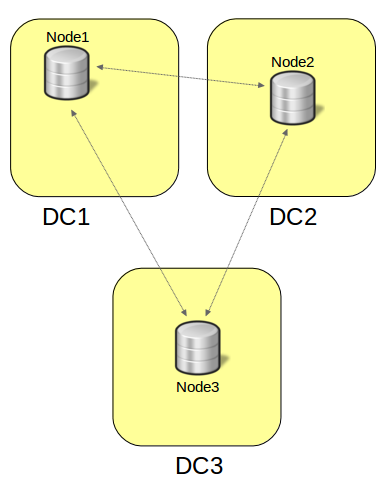
To provide more availability, spreading nodes in several datacenters is a common practice: if power fails in one DC, nodes are available elsewhere. The typical implementation is 3 nodes in 2 DCs:

3nodes

Notice that while this setup can handle any single node failure, it can’t handle all single DC failures: if we lose DC1, 2 nodes leave the cluster and the remaining node has not quorum. You can try with 4, 5 or any number of nodes and it will be easy to convince yourself that in all cases, losing one DC can make the whole cluster stop operating.

If you want to be resilient to a single DC failure, you must have 3 DCs, for instance like this:

3nodes_3DC

Other considerations

Sometimes other factors will make you choose a higher number of nodes. For instance, look at these requirements:

  • All traffic is directed to a single node.
  • The application should be able to fail over to another node in the same datacenter if possible.
  • The cluster must keep operating even if one datacenter fails.

The following architecture is an option (and yes, it has an even number of nodes!):

6nodes

Conclusion

Regarding availability, it is easy to estimate the number of nodes you need for your PXC cluster. But node failures are not the only aspect to consider: Resilience to a datacenter failure can, for instance, influence the number of nodes you will be using.

The post Percona XtraDB Cluster (PXC): How many nodes do you need? appeared first on MySQL Performance Blog.

Oracle license revenue and the MySQL ecosystem

Oracle was in the news recently with the story of its license revenue declining as much as 17% in the recent quarter. This is blamed on transitioning to the cloud in some publications, but others, such as Bloomberg and TechRepublic, look deeper, seeing open source software responsible for the bulk of it.

Things are especially interesting in the MySQL ecosystem, as Oracle both owns its traditional “Enterprise” Oracle database and MySQL – a more modern open source database.

At Percona we see the same story repeating among many of our enterprise customers:

  1. MySQL proves itself. This generally happens one of two ways. One is for the enterprise using traditional enterprise databases, such as Oracle or DB2, to acquire a company which has been built on MySQL. After the dust settles the CFO or CIO discovers that the acquired company has been successfully running business-critical operations with MySQL and spending hundreds of thousands of dollars on database support instead of tens of millions. At this point it’s been shown that it can be done, so it should continue.

The other way is for MySQL to rise through the ranks in an organization. Typically it starts with some small MySQL use, such as running a bug tracking application in the IT department. Then it moves to MySQL being used with Drupal to power the main corporate website and an e-commerce function with Magento or something similar. Over time, MySQL proves itself and is trusted to handle more and more “core” enterprise databases that are absolutely critical for the business.

Interestingly enough, contrary to what some people have said, MySQL ownership by Oracle helps it to gain trust with many enterprise accounts. Enterprises may not like Oracle’s license and maintenance fees, but they like Oracle’s quality engineering, attention to security and predictable releases.

  1. New applications are built using MySQL. As the enterprise is ready to embrace MySQL it is added to the approved database list and now internal teams can use it to develop applications. In many cases the mandate goes even further with MySQL than with other open source technologies, as it is given preference, and teams need to really justify to management when they want to use Oracle or other proprietary database technologies. There are some cases when that may be warranted, but in most cases MySQL is good enough.
  1. Moving existing applications from Oracle to MySQL.  Depending on the organization and applications it can happen a couple of different ways. One is the equivalent applications are built from scratch on the new open source technology stack and the old application is retired. The other is only the database is migrated from Oracle to MySQL. Moving the database from Oracle to MySQL might be easy and might be close to a full application rewrite. For example, we see Java applications which often use the database as a simple data store through the ORM framework which can be moved to MySQL easily; on the other hand, applications built with extensive use of advanced stored procedures and Oracle-specific SQL extensions are much harder to move.

The wave of moving to open source database technologies will continue and we’re not alone in thinking that – Gartner believes that by 2018, 70% of new in-house applications will be built on open source database systems.

What are we currently seeing in the MySQL ecosystem? First, many customers tell us that they are looking at hefty price increases for MySQL support subscriptions. Some of the customers which had previously signed 5 year agreements with Sun (at the time it was acquired by Oracle) who are exploring renewing now, see price increases as much as 5x for a comparable environment. This is very understandable considering the pressures Oracle has on the market right now.

The issues, however, go deeper than the price. Many customers are not comfortable trusting Oracle to give them the best possible advice for moving from expensive Oracle to a much less expensive Oracle MySQL database. The conflicts are obvious when the highest financial reward comes to Oracle by proving applications can’t be moved to MySQL or any other open source database.

If you’re choosing MySQL, Oracle is financially interested in having you use the Enterprise Edition, which brings back many of the vendor lock-in issues enterprises are trying to avoid by moving to open source databases. Customers believe Oracle will ensure enterprise-only features are put in use in the applications, making it difficult to avoid renewing at escalating prices.

So what do our customers see in Percona which makes them prefer our support and other services to those of Oracle?

  • We are a great partner if you’re considering moving from the Oracle database to MySQL as we both have years of experience and no conflict of interest.
  • Percona Server, Percona XtraDB Cluster, Percona Xtrabackup and our other software for the MySQL ecosystem is 100% open source, which means we’re not trying to lock you into the “enterprise version” as we work together. Furthermore, many of the features which are only available in MySQL Enterprise Edition are available in the fully open source Percona Server, including audit, backup and authentication.
  • We are focused on solutions for your business, not pushing Percona-branded technology. If you choose to use Percona Server, great! If you are using MySQL, MariaDB, Amazon RDS, etc., that’s great too.

With the continuing trend of moving to open source database management systems the cost pressures on people running proprietary databases will continue to increase, and the only real solution is to accelerate moving to the open source stack. As you do that, you’re better off moving to completely open source technology, such as what is available from Percona, to avoid vendor lock-in. If you’re looking for the partner to help you to assess the migration strategy and execute the move successfully, check for conflicts of interests and ensure the interests of your and your provider are completely aligned.

The post Oracle license revenue and the MySQL ecosystem appeared first on MySQL Performance Blog.

Tips for avoiding malware from a lesson learned

Tips for avoiding malware from a lesson learnedIn a recent article on the Percona blog, I recommended readers to a tool called CamStudio for making technical screen recordings. The blog post was very popular and got 300+ Facebook likes in a short time. Providentially though, a reader commented that the installer (as downloaded from the project website) installed “pretty annoying adware on [his] PC.”

As I had been using a slightly dated installer, which did not show this issue, I started looking into the reader’s claims. Besides finding that the reader was correct in his claims about the project website’s installer, I found that even the installer from sourceforge.com (a well known open source download site) had a significant amount of adware in it.

However, the worst had yet to come. Reading through the CamStudio forum on SourceForge, I found out that the CamStudio binaries had apparently been plagued by adware and possibly also viruses and malware. I am however always somewhat suspicious of such reports; consider for example that CamStudio’s competitor TechSmith sells a very similar product (originally based on the same source code I believe) at $299 US per license. Not saying it happened, but one can easily see why competing companies may try to eliminate the open source/free competition.

Still, being cautious, I ran my older original installer (which did not have the adware issues) through virustotal.com, a Google service I learned about during this ‘adventure’. “Guess what” my daughter would say. It had a malware Trojan (Trojan.Siggen6.33552) in it which had only been discovered by a anti-virus software company last April, and only one in 56 virus scanners picked it up according to https://www.virustotal.com! Once the situation was clear, I immediately removed the blog post!

Clearly this was turning out not to be my day. Reading up on this Trojan proved that it was ‘designed for installation of another malware’. Given that Trojan.Siggen6.33552 had only been discovered in April, and given that it may have been installing other malware as per the anti-virus company who discovered it, I quickly decided to reinitialize my Windows PC. Better safe then sorry.

As I mentioned to my colleague David Busby, when you have something happen like this, you become much more security conscious! Thus, I did a review of my network security and was quite amazed at what I found, especially when compared with online security reports.

For example, we have uPnP (universal plug and play) on our routers, Skype automatically installs a (quite wide) hole in the Windows Firewall (seemingly even where it is not necessary), and we allow all 3rd party cookies in all our browsers. One would think this is all fine, but it makes things more easy for attackers!

     Besides virustotal.com, David showed me https://malwr.com – another great resource for analysing potential malwares.

Did you know that with the standard Skype settings, someone can easily work out your IP address? Don’t believe it? If you’re on Windows, go to Skype > Tools > Options > Advanced > Connection and hover your mouse over the blue/white question mark after ‘Allow direct connections to your contacts only’. You’ll see that it says “When you call someone who isn’t a contact, we’ll keep your IP address hidden. This may delay your call setup time.“ And apparently on Linux this option is not even directly available (more info here).

So, for example, to make Skype more secure I did 1) untick ‘use port 80 and 443 for additional incoming connections’, 2) setup a fixed port and punched a hole in the Windows firewall just for that port, for a specific program, a specific user, and for a specific IP range (much more restricted than the wide hole that was already there), 3) Removed the “Skype rule” which seemingly was placed there by the Skype installer, 4) Disabled uPnP on my router, 5) Disabled Skype from using uPnP, 6) Ticked ‘Allow direct connections to your contacts only’. Phewy. (Note that disabling uPnP (being a convenience protocol) can lead to some issues with smartTV’s / consoles / mobile phone apps if disabled.)

     All our networking & software setup these days is mostly about convenience.

Further reviewing the Windows firewall rules, I saw many rules that could be either removed or tied down significantly. It was like doing QA on my own network (phun intended :). The same with the router settings. Also did a router firmware upgrade, and installed the latest Windows security patches. All of the sudden that previously-annoying ‘we’ll just shut down your pc to install updates, even if you had work open’ feature in Windows seemed a lot more acceptable :) (I now have a one-week timeout for automatic restarts).

For the future ahead, when I download third party utilities (open source or not), I will almost surely run them through virustotal.com – a fantastic service by Google. It’s quite quick and easy to do; download, upload, check. I also plan to once in a while review Windows firewall rules, program security settings (especially for browsers and tools like Skype etc.), and see if there are Windows updates etc.

The most surprising thing of all? Having made all these security restrictions has given me 0% less functionality thus far.

Maybe it is indeed time we wake up about security.

The post Tips for avoiding malware from a lesson learned appeared first on MySQL Performance Blog.