Heartbleed: Separating FAQ From FUD

If you’ve been following this blog (my colleague, David Busby, posted about it yesterday) or any tech news outlet in the past few days, you’ve probably seen some mention of the “Heartbleed” vulnerability in certain versions of the OpenSSL library.

So what is ‘Heartbleed’, really?

In short, Heartbleed is an information-leak issue. An attacker can exploit this bug to retrieve the contents of a server’s memory without any need for local access. According to the researchers that discovered it, this can be done without leaving any trace of compromise on the system. In other words, if you’re vulnerable, they can steal your keys and you won’t even notice that they’ve gone missing. I use the word “keys” literally here; by being able to access the contents of the impacted service’s memory, the attacker is able to retrieve, among other things, private encryption keys for SSL/TLS-based services, which means that the attacker would be able to decrypt the communications, impersonate other users (see here, for example, for a session hijacking attack based on this bug), and generally gain access to data which is otherwise believed to be secure. This is a big deal. It isn’t often that bugs have their own dedicated websites and domain names, but this one does: http://www.heartbleed.com

Why is it such a big deal?

One, because it has apparently been in existence since at least 2012. Two, because SSL encryption is widespread across the Internet. And three, because there’s no way to know if your keys have been compromised. The best detection that currently exists for this are some Snort rules, but if you’re not using Snort or some other IDS, then you’re basically in the dark.

What kinds of services are impacted?

Any software that uses the SSL/TLS features of a vulnerable version of OpenSSL. This means Apache, NGINX, Percona Server, MariaDB, the commercial version of MySQL 5.6.6+, Dovecot, Postfix, SSL/TLS VPN software (OpenVPN, for example), instant-messaging clients, and many more. Also, software packages that bundle their own vulnerable version of SSL rather than relying on the system’s version, which might be patched. In other words, it’s probably easier to explain what isn’t affected.

What’s NOT impacted?

SSH does not use SSL/TLS, so you’re OK there. If you downloaded a binary installation of MySQL community from Oracle, you’re also OK, because the community builds use yaSSL, which is not known to be vulnerable to this bug. Obviously, any service which doesn’t use SSL/TLS is not going to be vulnerable, either, since the salient code paths aren’t going to be executed. So, for example, if you don’t use SSL for your MySQL connections, then this bug isn’t going to affect your database server, although it probably still impacts you in other ways (e.g., your web servers).

What about Amazon cloud services?

According to Amazon’s security bulletin on the issue, all vulnerable services have been patched, but they still recommend that you rotate your SSL certificates.

Do I need to upgrade Percona Server, MySQL, NGINX, Apache, or other server software?

No, not unless you built any of these and statically-linked them with a vulnerable version of OpenSSL. This is not common. 99% of affected users can fix this issue by upgrading their OpenSSL libraries and cycling their keys/certificates.

What about client-level tools, like Percona Toolkit or XtraBackup?

Again, no. The client sides of Percona Toolkit, Percona XtraBackup, and Percona Cloud Tools (PCT) are not impacted. Moreover, the PCT website has already been patched. Encrypted backups are still secure.

There are some conflicting reports out there about exactly how much information leakage this bug allows. What’s the deal?

Some of the news articles and blogs claim that with this bug, any piece of the server’s memory can be accessed. Others have stated that the disclosure is limited to memory space owned by processes using a vulnerable version of OpenSSL. As far as we are aware, and as reported in CERT’s Vulnerability Notes Database, the impact of the bug is the latter; i.e., it is NOT possible for an attacker to use this exploit to retrieve arbitrary bits of your server’s memory, only bits of memory from your vulnerable services. That said, your vulnerable services could still leak information that attackers could exploit in other ways.

How do I know if I’m affected?

You can test your web server at http://filippo.io/Heartbleed/ – enter your site’s URL and see what it says. If you have Go installed, you can also get a command-line tool from Github and test from the privacy of your own workstation. There’s also a Python implementation. You can also check the version of OpenSSL that’s installed on your servers. If you’re running OpenSSL 1.0.1 through 1.0.1f or 1.0.2-beta, you’re vulnerable. (Side note here: some distributions, such as RHEL/CentOS, have patched the issue without actually updating the OpenSSL version number; on RPM-based systems you can view the changelog to see if it’s been fixed, for example:

rpm -q --changelog openssl | head -2
* Mon Apr 07 2014 Tomáš Mráz <tmraz@redhat.com> 1.0.1e-16.7
- fix CVE-2014-0160 - information disclosure in TLS heartbeat extension

Also, note that versions of OpenSSL prior to 1.0.1 are not known to be vulnerable. If you’re still unsure, we would be happy to assist you in determining the extent of the issue in your environment and taking any required corrective action. Just give us a call.

How can I know if I’ve been compromised?

If you’ve already been compromised, you won’t. However, if you use Snort as an IDS, you can use some rules developed by Fox-IT to detect and defer new attacks; other IDS/IPS vendors may have similar rule updates available. Without some sort of IDS in place, however, attacks can and will go unnoticed.

Are there any exploits for this currently out there?

Currently, yes, there are some proofs-of-concept floating around out there, although before this week, that was uncertain. But given that this is likely a 2-year-old bug, I would be quite surprised if someone, somewhere (you came to my talk at Percona Live last week, didn’t you? Remember what I said about assuming that you’re already owned?) didn’t have a solid, viable exploit.

So, then, what should I do?

Ubuntu, RedHat/CentOS, Amazon, and Fedora have already released patched versions of the OpenSSL library. Upgrade now. Do it now, as in right now. If you’ve compiled your own version of OpenSSL from source, upgrade to 1.0.1g or rebuild your existing source with the -DOPENSSL_NO_HEARTBEATS flag.

Once that’s been done, stop any certificate-using services, regenerate the private keys for any services that use SSL (Apache, MySQL, whatever), and then obtain a new SSL certificate from whatever certificate authority you’re using. Once the new certificates are installed, restart your services. You can also, of course, do the private key regeneration and certificate cycling on a separate machine, and only bring the service down long enough to install the new keys and certificates. Yes, you will need to restart MySQL. Or Apache. Or whatever. Full stop, full start, no SIGHUP (or equivalent).

Unfortunately, that’s still not all. Keeping in mind the nature of this bug, you should also change / reset any user passwords and/or user sessions that were in effect prior to patching your system and recycling your keys. See, for example, the session hijacking exploit referenced above. Also note that Google services were, prior to their patching of the bug, vulnerable to this issue, which means that it’s entirely possible that your Gmail login (or any other Google-related login) could have been compromised.

Can I get away with just upgrading OpenSSL?

NO. At a bare minimum, you will need to restart your services, but in order to really be sure you’ve fixed the problem, you also need to cycle your keys and certificates (and revoke your old ones, if possible). This is the time-consuming part, but since you have no way of knowing whether or not someone has previously compromised your private keys (and you can bet that now that the bug is public, there will be a lot of would-be miscreants out there looking for servers to abuse), the only safe thing to do is cycle them. You wouldn’t leave your locks unchanged after being burgled, would you?

Also note that once you do upgrade OpenSSL, you can get a quick list of the services that need to be restarted by running the following:

sudo lsof | grep ssl | grep DEL

Where can I get help and/or more information?

In addition to the assorted links already mentioned, you can read up on the nuts and bolts of this bug, or various news articles such as this or this. There are a lot of articles out there right now, most of which are characterizing this as a major issue. It is. Test your vulnerability, upgrade your OpenSSL and rotate your private keys and certificates, and then change your passwords.

The post Heartbleed: Separating FAQ From FUD appeared first on MySQL Performance Blog.
Tools and tips for analysis of MySQL’s Slow Query Log

MySQL's Slow Query LogMySQL has a nice feature, slow query log, which allows you to log all queries that exceed a predefined about of time to execute. Peter Zaitsev first wrote about this back in 2006 – there have been a few other posts here on the MySQL Performance Blog since then (check this and this, too) but I wanted to revisit his original subject in today’s post.

Query optimization is essential for good database server performance and usually DBAs need to ensure the top performance possible for all queries. In MySQL, the desirable way is to generate a query log for all running queries within a specific time period and then run a query analysis tool to identify the bad queries. Percona Toolkit’s pt-query-digest is one of the most powerful tools for SQL analysis. That’s because pt-query-digest can generate a very comprehensive report that spots problematic queries very efficiently. It works equally well with Oracle MySQL server. This post will focus mainly on pt-query-digest.

Slow query log is great at spotting really slow queries that are good candidates for optimization. Beginning with MySQL 5.1.21, the minimum value is 0 for long_query_time, and the value can be specified to a resolution of microseconds. In Percona Server additional statistics may be output to the slow query log. You can find the full details here. For our clients, we often need to identify queries that impact an application the most. It does not always have to be the slowest queries – queries that runs more frequently with lower execution time per call put more load on a server than queries running with lower frequency. We of course want to get rid of really slow queries but to really optimize application throughput, we also need to investigate queries that generate most of the load. Further, if you enable option log_queries_not_using_indexes  then MySQL will log queries doing full table scans which doesn’t always reflect that the query is slow, because in some situations the query optimizer chooses full table scan rather than using any available index or probably showing all records from a small table.

Our usual recommendation is to generate the slow log with long_query_time=0. This will record all the traffic but this will be I/O intensive and will eat up disk space very quickly depending on your workload. So beware of running with long_query_time=0 for only a specific period of time and revert it back to logging only very slow queries. In Percona Server there is nice option where you can limit the rate of logging, log_slow_rate_limit is the option to handle it. Filtering slow query log is very helpful too in some cases e.g. if we know the main performance issue is table scans we can log queries only doing full table scans or if we see I/O is bottleneck we can collect queries doing full scans and queries creating on disk temporary tables. Again, this is only possible in Percona Server with the log_slow_filter option. Also, you may want to collect everything on slow query log and then filter with pt-query-digest. Depending on I/O capacity, you might prefer one or another way, as collecting everything in slow query log allows us to investigate other queries too if needed. Finally, use pt-query-digest to generate an aggregate report over slow query log which highlights the problematic part very efficiently. Again, pt-query-digest can bring up server load high so our usual recommendation on it is to move slow query log to some staging/dev server and run pt-query-digest over there to generate the report.

Note: changing the long_query_time parameter value only affects newly created connections to log queries exceeds long_query_time threshold. In Percona Server there is feature which changes variable scope to global instead of local. Enabling slow_query_log_use_global_control  log queries for connected sessions too after changing long_query_time parameter threshold. You can read more about this patch here.

I am not going to show you a detailed report of pt-query-digest and explain each part of it here, because it is well defined already by my colleague Ovais Tariq in this post. However, I will show you some of the other aspects of pt-query-digest tool here.

Let me show you code snippets that enable slow query log for only a specific time period with long_query_time=0 and log_slow_verbosity to ‘full’. log_slow_verbosity is a Percona Server variable which logs extra stats such as information on query cache, Filesort, temporary tables, InnoDB statistics etc. Once you are done collecting logs, revert back the values for long_query_time to the previous value, and finally run pt-query-digest on the log to generate report. Note: run the below code in same MySQL session.

-- Save previous settings
mysql> SELECT @@global.log_slow_verbosity INTO @__log_slow_verbosity;
mysql> SELECT @@global.long_query_time INTO @__long_query_time;
mysql> SELECT @@global.slow_query_log INTO @__slow_query_log;
mysql> SELECT @@global.log_slow_slave_statements INTO @__log_slow_slave_statements;
-- Keep this in safe place, we'll need to run pt-query-digest
mysql> SELECT NOW() AS "Time Since";
-- Set values to enable query collection
mysql> SET GLOBAL slow_query_log_use_global_control='log_slow_verbosity,long_query_time';
mysql> SET GLOBAL log_slow_verbosity='full';
mysql> SET GLOBAL slow_query_log=1;
mysql> SET GLOBAL long_query_time=0;
mysql> SET GLOBAL log_slow_slave_statements=1;
-- Verify settings are OK
mysql> SELECT @@global.long_query_time, @@global.slow_query_log, @@global.log_slow_verbosity;
-- wait for 30 - 60 minutes
-- Keep this one too, also for pt-query-digest
mysql> SELECT NOW() AS "Time Until";
-- Revert to previous values
mysql> SET GLOBAL slow_query_log=@__slow_query_log;
mysql> SET GLOBAL long_query_time=@__long_query_time;
mysql> SET GLOBAL log_slow_verbosity=@__log_slow_verbosity; -- if percona server
mysql> SET GLOBAL log_slow_slave_statements=@__log_slow_slave_statements;
-- Verify settings are back to previous values
mysql> SELECT @@global.long_query_time, @@global.slow_query_log, @@global.log_slow_verbosity, @@global.slow_query_log_file;
-- Then with pt-query-digest run like (replace values for time-since, time-until and log name)
$ pt-query-digest --since='<time-since>' --until='<time-until>' --limit=100% /path/to/slow_query_log_file.log > /path/to/report.out
-- If you're not using Percona Server then you need to remove all references to log_slow_verbosity, slow_query_log_use_global_control and log_slow_slave_statements (priot MySQL 5.6).

My colleague Bill Karwin wrote bash script that does almost the same as the above code. You can find the script to collect slow logs here. This script doesn’t hold connection to the database session while you wait for logs to accumulate and it sets all the variables back to the state they were before. For full documentation view this.

Further, you can also get explain output into the report from the pt-query-digest tool. For that you need to use –explain parameter similar to as follows.

$ pt-query-digest --explain u=<user>,p=<password>,h=<hostname> /path/to/slow.log > /path/to/report.out

Explain output in query report will get you all the information for query execution plan and explain output signal towards how that particular query going to be executed. Note that, if you execute pt-query-digest over slow query log other than originated server of slow query log as I mentioned above e.g. staging/dev you may get different execution path for the query in the report or lower number of rows to examined, etc., because usually staging/dev servers has different data distribution, different MySQL versions, or different indexes. MySQL explain adds overhead as queries needs to be prepared on the server to generate intended query execution path. For this reason, you may want to run pt-query-digest with –explain on a production replica.

It’s worth mentioning that logging queries with log_slow_verbosity in Percona Server is really handy as it shows lots of additional statistics and it is more helpful in situations when the explain plan reports a different execution path than when the query is executed. On that particular topic, you may want to check this nice post.

pt-query-digest also supports filters. You can read more about it here. Let me show you an example. The following command will discard everything apart from insert/update/delete queries in pt-query-digest output report.

$ pt-query-digest --filter '$event->{arg} =~ m/^(insert|update|delete)/i' --since='<time-since>' --until='<time-until>' --limit=100% /path/to/slow_query_log_file.log > /path/to/report.out

If you’re looking for some GUI tools for pt-query-digest then I would recommend reading this nice blogpost from my colleague Roman. Further, our CEO Peter Zaitsev also wrote a post recently where he shows the comparison between performance_schema and slow query log. Check here for details.

In related new, Percona recently announced Percona Cloud Tools, the next generation of tools for MySQL. It runs a client-side agent (pt-agent) which runs pt-query-digest on the server with some intervals and uploads the aggregated data to the Percona Cloud Tools API which process it further.  Query Analytics is one tool from the Percona Cloud Tools that provides advanced query metrics. It  is a nice visualization tool. You may be interested to learn more about it here, and it’s also worth viewing this related webinar about Percona Cloud Tools from our CTO Vadim Tkachenko.

Conclusion:
pt-query-digest from Percona Toolkit is a versatile (and free) tool for slow query log analysis. It provides good insight about every individual query, especially in Percona Server with log_slow_verbosity enabled, e.g. log queries with microsecond precision, log information about the query’s execution plan. On top of that, Percona Cloud Tools includes Query Analytics which provides you with good visuals about query performance and also provides a view of historical data.

The post Tools and tips for analysis of MySQL’s Slow Query Log appeared first on MySQL Performance Blog.

Percona Server 5.5.36-34.1 is now available

Percona Server version 5.5.36-34.1

Percona Server version 5.5.36-34.1

Percona is glad to announce the release of Percona Server 5.5.36-34.1 on March 17th, 2014 (Downloads are available here and from the Percona Software Repositories). Based on MySQL 5.5.36, including all the bug fixes in it, Percona Server 5.5.36-34.1 is now the current stable release in the 5.5 series. All of Percona‘s software is open-source and free, all the details of the release can be found in the 5.5.36-34.1 milestone at Launchpad.

Bugs Fixed:

  • After installing the auth_socket plugin any local user might get root access to the server. If you’re using this plugin upgrade is advised. This is a regression, introduced in Percona Server 5.5.31-30.3. Bug fixed #1289599.
  • The new client and server packages included files with paths that were conflicting with the ones in mysql-libs package on CentOS. Bug fixed #1278516.
  • A clean installation of Percona-Server-server-55 on CentOS would fail due to a typo in mysql_install_db call. Bug fixed #1291247.
  • Percona-Server-shared-55 package was still declared as providing mysql-libs, but it is not actually providing it anymore. Bug fixed #1291249.
  • Slave I/O thread wouldn’t attempt to automatically reconnect to the master after a network time-out (error: 1159). Bug fixed #1268729 (upstream #71374).
  • Slave I/O thread wouldn’t attempt to automatically reconnect to the master if setting master_heartbeat_period failed with a transient network error. Bug fixed #1268735 (upstream #71375).

Renaming the libmysqlclient to libperconaserverclient

This release fixes some of the issues caused by the libmysqlclient rename to libperconaserverclient in Percona Server 5.5.36-34.0. The old name was conflicting with the upstream libmysqlclient.

Except for packaging, libmysqlclient and libperconaserverclient of the same version do not have any differences. Users who previously compiled software against Percona-provided libmysqlclient will either need to install the corresponding package of their distribution, such as distribution or Oracle-provided package for CentOS and libmysqlclient18 for Ubuntu/Debian or recompile against libperconaserverclient. Another workaround option is to create a symlink from libperconaserverclient.so.18.0.0 to libmysqlclient.so.18.0.0.

Release notes for Percona Server 5.5.36-34.1 are available in our online documentation. Bugs can be reported on the launchpad bug tracker.

The post Percona Server 5.5.36-34.1 is now available appeared first on MySQL Performance Blog.
Percona Server with TokuDB: Packing 15TB into local SSDs

Two weeks ago we released an Alpha release of Percona Server with TokuDB. Right now I am on a final stage of evaluation of TokuDB for using in our project Percona Cloud Tools and it looks promising.

What is the most attractive in TokuDB? For me it is compression, but not just compression: TokuDB provides great performance over compressed data.

In my synthetic tests I saw a compression ratio of 10:1 (TokuDB LZMA to InnoDB uncompressed), in the real production data it is less, 6:1, but still impressive.

In our servers we have 4 x SSD Crucial M500 960GB combined in RAID5, which give 2877.0 GB of usable space. With TokuDB we should be able to pack around 15TB of raw data. Of course we can try InnoDB compression, but the best we can get is 2x compression without sacrificing performance.

And of course TokuDB is transaction, fully ACID-compliant with automatic crash-recovery storage engine.

This all makes TokuDB a very attractive choice for handling terabytes of data (or as it popular to say nowadays “BigData”).

One of first operational questions we have is how to handle backups.
For backups we use LVM partitions and the mylvmbackup tool. Unfortunately Percona XtraBackup is not able to handle TokuDB tables (and probably won’t be able anytime soon). The other choice is to use TokuDB Hot back-up, available by Tokutek Enterprise Subscription. I did not test it myself, so I can’t provide any feedback.

And of course there are things which I do not fully like in TokuDB:

  • No Foreign Keys support. It is not a big issue for us, but I know for some users this is a showstopper.
  • Time-based checkpoints. You may not notice a direct effect from this, but we clearly see it in our benchmarks. Every 60 sec (default timeperiod between checkpoints) we see a drop in throughput during write-intensive benchmarks. It is very similar to drops in InnoDB we tried to solve (and are still trying), for example see Adaptive flushing in MySQL 5.6. My advice to the Tokutek team would be to also look into a fuzzy check-pointing, instead of time-based.
  • All TokuDB files are stored in a single directory, sometime with mangled filenames. This especially becomes bad in sharding or multi-tenant environments when tens of thousands of files are in the same directory

Well, I guess for now, we will take these limitations as TokuDB specific and will deal with them.

Next week we plan on a Beta release of Percona Server with TokuDB, so stay tuned!

The post Percona Server with TokuDB: Packing 15TB into local SSDs appeared first on MySQL Performance Blog.

Percona Server 5.6.16-64.1 is now available

Percona Server version 5.6.16-64.1

Percona Server version 5.6.16-64.1

Percona is glad to announce the release of Percona Server 5.6.16-64.1 on March 17th, 2014 (Downloads are available here and from the Percona Software Repositories.

Based on MySQL 5.6.16, including all the bug fixes in it, Percona Server 5.6.16-64.1 is the current GA release in the Percona Server 5.6 series. All of Percona’s software is open-source and free, all the details of the release can be found in the 5.6.16-64.1 milestone at Launchpad.

Bugs Fixed:

  • After installing the auth_socket plugin any local user might get root access to the server. If you’re using this plugin upgrade is advised. This is a regression, introduced in Percona Server 5.6.11-60.3. Bug fixed #1289599
  • The new client and server packages included files with paths that were conflicting with the ones in mysql-libs package on CentOS. Bug fixed #1278516.
  • A clean installation of Percona-Server-server-55 on CentOS would fail due to a typo in mysql_install_db call. Bug fixed #1291247.
  • libperconaserverclient18.1 Debian/Ubuntu packages depended on multiarch-support, which is not available on all the supported distribution versions. Bug fixed #1291628.
  • The InnoDB file system mutex was being locked incorrectly if Atomic write support for Fusion-io devices was enabled. Bug fixed #1287098.
  • Slave I/O thread wouldn’t attempt to automatically reconnect to the master after a network time-out (error: 1159). Bug fixed #1268729 (upstream #71374).

Renaming the libmysqlclient to libperconaserverclient

This release fixes some of the issues caused by the libmysqlclient rename to libperconaserverclient in Percona Server 5.6.16-64.0. The old name was conflicting with the upstream libmysqlclient.

Except for packaging, libmysqlclient and libperconaserverclient of the same version do not have any differences. Users who previously compiled software against Percona-provided libmysqlclient will either need to install the corresponding package of their distribution, such as distribution or Oracle-provided package for CentOS and libmysqlclient18 for Ubuntu/Debian or recompile against libperconaserverclient. Another workaround option is to create a symlink from libperconaserverclient.so.18.0.0 to libmysqlclient.so.18.0.0.

Release notes for Percona Server 5.6.16-64.1 are available in our online documentation. Bugs can be reported on the launchpad bug tracker.

The post Percona Server 5.6.16-64.1 is now available appeared first on MySQL Performance Blog.

High-availability options for MySQL, October 2013 update

table
{
border-collapse:collapse;
}
table, td, th
{
border:1px solid black;
padding:1px;
vertical-align:top;
font-size:9px;
}
th
{
background-color:lightgray;
}
ul
{
padding:5px;
margin:15px;
}

The technologies allowing to build highly-available (HA) MySQL solutions are in constant evolution and they cover very different needs and use cases. In order to help people choose the best HA solution for their needs, we decided, Jay Janssen and I, to publish, on a regular basis (hopefully, this is the first), an update on the most common technologies and their state, with a focus on what type of workloads suite them best. We restricted ourselves to the open source solutions that provide automatic failover. Of course, don’t simply look at the number of Positives/Negatives items, they don’t have the same values. Should you pick any of these technologies, heavy testing is mandatory, HA is never beyond scenario that have been tested.

Percona XtraDB Cluster (PXC)

Percona XtraDB Cluster (PXC) is a version of Percona Server implementing the Galera replication protocol from Codeship.

Positive pointsNegative points
  • Almost synchronous replication, very small lag if any
  • Automatic failover
  • At best with small transactions
  • All nodes are writable
  • Very small read after write lag, usually no need to care about
  • Scale reads very well and to some extent, writes
  • New nodes are provisioned automatically through State Snapshot Transfer (SST)
  • Multi-threaded apply, greater write capacity than regular replication
  • Can do geographical disaster recovery (Geo DR)
  • More resilient to unresponsive nodes (swapping)
  • Can resolve split-brain situations by itself
  • Still under development, some rough edges
  • Large transactions like multi-statement transactions or large write operations cause issues and are usually not a good fit
  • For quorum reasons, 3 nodes are needed but one can be a lightweight arbitrator
  • SST can be heavy over a Wan
  • Commit are affected by the network latency, this impacts especially Geo DR
  • To achieve HA, a load balancer, like haproxy, is needed
  • Failover time is determined by the load balancer check frequency
  • Performance is affected by the weakest/busiest node
  • Foreign Keys are potential issues
  • MyISAM should be avoided
  • Can be mixed with regular async replication as master or slave but, slaves are not easy to reconfigure after a SST on their master
  • Require careful setup of the host, swapping can lead to node expulsion from the cluster
  • No manual failover mode
  • Debugging some Galera protocol issues isn’t trivial


Percona replication manager (PRM)

Percona replication manager (PRM) uses the Linux HA Pacemaker resource manager to manage MySQL and replication and provide high-availability. Information about PRM can be found here, the official page on the Percona web site is in the making.

Positive pointsNegative points
  • Nothing specific regarding the workload
  • Unlimited number of slaves
  • Slaves can have different roles
  • Typically VIP based access, typically 1 writer VIP and many reader VIPs
  • Also works without VIP (see the fake_mysql_novip agent)
  • Detects if slave lags too much and remove reader VIPs
  • All nodes are monitored
  • The best slaves is picked for master after failover
  • Geographical Disaster recovery possilbe with the lightweight booth protocol
  • Can be operated in manual failover mode
  • Graceful failover is quick, under 2s in normal conditions
  • Ungraceful failover under 30s
  • Distributed operation with Pacemaker, no single point of failure
  • Builtin pacemaker logic, stonith, etc. Very rich and flexible.
  • Still under development, some rough edges
  • Transaction maybe lost is master crashes (async replication)
  • For quorum reasons, 3 nodes are needed but one can be a lightweight arbitrator
  • Only one node is writable
  • Read after write may not be consistent (replication lag)
  • Only scales reads
  • Careful setup for the host, swapping can lead to node expulsion from the cluster
  • Data inconsistency can happen if the master crashes (fix coming)
  • Pacemaker is complex, logs are difficult to read and understand


MySQL master HA (MHA)

Like with PRM above, MySQL master HA (MHA), provides high-availability through replication. The approach is different, instead of relying on an HA framework like Pacemaker, it uses Perl scripts. Information about MHA can be found here.

Positive pointsNegative points
  • Mature
  • Nothing specific regarding the workload
  • No latency effects on writes
  • Can have many slaves and slaves can have different roles
  • Very good binlog/relaylog handling
  • Work pretty hard to minimise data loss
  • Can be operated in manual failover mode
  • Graceful failover is quick, under 5s in normal conditions
  • If the master crashes, slaves will be consistent
  • The logic is fairly easy to understand
  • Transaction maybe lost is master crashes (async replication)
  • Only one node is writable
  • Read after write may not be consistent (replication lag)
  • Only scales reads
  • Monitoring and logic are centralized, single-point of failure, a network partition can cause a split-brain
  • Custom fencing devices, custom VIP scripts, no reuse of other projects tools
  • Most of the deployments are using manual failover (at least at Percona)
  • Requires priviledged ssh access to read relay-logs, can be a security concern
  • No monitoring of the slave to invalidate it if it lags too much or if replication is broken, need to be done by external tool like HAProxy
  • Careful setup for the host, swapping can lead to node expulsion from the cluster


NDB Cluster

NDB cluster is the most high-end form of high-availability configuration for MySQL. It is a complete shared nothing architecture where the storage engine is distributed over multiple servers (data nodes). Probably the best starting point with NDB is the official document, here.

Positive pointsNegative points
  • Mature
  • Synchronous replication
  • Very good at small transactions
  • Very good at high concurrency (many client threads)
  • Huge transaction capacity, more than 1M trx/s are not uncommon
  • Failover can be ~1s
  • No single point of failure
  • Geographical disaster recovery capacity built-in
  • Strong at async replication, applying by batches gives multithreaded apply at the data node level
  • Can scale reads and writes, the framework implements sharding by hashes
  • Not a drop-in replacement for Innodb, you need to tune the schema and the queries
  • Not a general purpose database, some loads like reporting are just bad
  • Only the Read-commited isolation level is available
  • Hardware heavy, need 4 servers mininum for full HA
  • Memory (RAM) hungry, even with disk-based tables
  • Complex to operate, lots of parameters to adjust
  • Need a load balancer for failover
  • Very new foreign key support, field reports scarce on it


Shared storage/DRBD

Achieving high-availability use a shared storage medium is an old and well known method. It is used by nearly all the major databases. The share storage can be a DAS connected to two servers, a LUN on SAN accessible from 2 servers or a DRBD partition replicated synchronously over the network. DRBD is by bar the most common shared storage device used in the MySQL world.

Positive pointsNegative points
  • Mature
  • Synchronous replication (DRBD)
  • Automatic failover is easy to implement
  • VIP based access
  • Write capacity is impacted by network latency for DRBD
  • SANs are expensive
  • Only for InnoDB
  • Standby node, a big server doing nothing
  • Need a warmup period after failover to be fully operational
  • Disk corruption can spread


The post High-availability options for MySQL, October 2013 update appeared first on MySQL Performance Blog.

Percona Server 5.6.14-62.0 is now available

Percona Server version 5.6.14-62.0

Percona Server version 5.6.14-62.0

Percona is glad to announce the release of Percona Server 5.6.14-62.0 on October 24th, 2013 (Downloads are available here and from the Percona Software Repositories.

Based on MySQL 5.6.14, including all the bug fixes in it, Percona Server 5.6.14-62.0 is the current GA release in the Percona Server 5.6 series. All of Percona’s software is open-source and free, all the details of the release can be found in the 5.6.14-62.0 milestone at Launchpad.

New Features:

Bugs Fixed:

  • Percona Server could crash server could crash while accessing BLOB or TEXT columns in InnoDB tables if the Support for Fake Changes was enabled. Bug fixed #1188168.
  • Expanded Program Option Modifiers did not deallocate memory correctly. Bug fixed #1167487.
  • Some Expanded Program Option Modifiers didn’t have an effect if they were specified in non-normalized way (innodb_io_capacity vs innodb-io-capacity). Bug fixed #1233294.
  • Building Percona Server with -DHAVE_PURIFY option would result in an error. Fixed by porting the close_socket function from MariaDB. Bug fixed #1203567.
  • Enabling Enforcing Storage Engine feature could lead to error on Percona Server shutdown. Bug fixed #1233354.
  • Storage engine enforcement (enforce_storage_engine) is now ignored when the server is started in either bootstrap or skip-grant-tables mode. Bug fixed #1236938.
  • When installed Percona Server 5.6.13-61.0 GA release was still showing RC instead of GA on Debian-based systems. Bug fixed #1239418.

Other bugs fixed: bug fixed #1238008, bug fixed #1190604, bug fixed #1200162, bug fixed #1188172, and bug fixed #1214727.

Release notes for Percona Server 5.6.14-62.0 are available in our online documentation. Bugs can be reported on the launchpad bug tracker.

The post Percona Server 5.6.14-62.0 is now available appeared first on MySQL Performance Blog.

Percona Server 5.5.34-32.0 is now available

Percona Server version 5.5.34-32.0

Percona Server version 5.5.34-32.0

Percona is glad to announce the release of Percona Server 5.5.34-32.0 on October 28th, 2013 (Downloads are available here and from the Percona Software Repositories). Based on MySQL 5.5.34, including all the bug fixes in it, Percona Server 5.5.34-32.0 is now the current stable release in the 5.5 series. All of Percona‘s software is open-source and free, all the details of the release can be found in the 5.5.34-32.0 milestone at Launchpad.

New Features:

  • Percona Server has extended the SELECT INTO ... OUTFILE and SELECT INTO DUMPFILE to add the support for UNIX sockets and named pipes.
  • Percona Server now provides additional information in the slow query log when log_slow_rate_limit variable is enabled.
  • A new variable slow_query_log_always_write_time has been introduced. It can be used to specify an additional execution time threshold for the slow query log, that, when exceeded, will cause a query to be logged unconditionally, that is, log_slow_rate_limit will not apply to it.
  • Utility user feature has been extended by adding a new utility_user_privileges that allows a comma separated value list of extra access privileges that can be granted to the utility user.

Bugs Fixed:

  • Due to an incompatible upstream change that went in unnoticed, the log tracker thread would attempt to replay any file operations it encountered. In most cases this were a no-op, but there were race conditions for certain DDL operations that would have resulted in server crash. Bug fixed #1217002.
  • apt-get upgrade of Percona Server would fail in post-installation step if server failed to start. Bug fixed #1002500.
  • Fixed the libssl.so.6 dependency issues in binary tarballs releases. Bug fixed #1172916.
  • Error in install_layout.cmake could cause that some library files, during the build, end up in different directories on x86_64 environment. Bug fixed #1174300.
  • Percona Server could crash while accessing BLOB or TEXT columns in InnoDB tables if Support for Fake Changes was enabled. Bug fixed #1188168.
  • Memory leak was introduced by the fix for bug #1132194. Bug fixed #1204873.
  • The unnecessary overhead from persistent InnoDB adaptive hash index latching has been removed, potentially improving stability of the Multiple Adaptive Hash Search Partitions feature as well. Upstream bug fixed #70216, bug fixed #1218347.
  • Fixed the incorrect dependency with libmysqlclient18-dev from Percona Server 5.5.33-31.1. Bug fixed #1237097.
  • A memory leak in Utility user feature has been fixed. Bug fixed #1166638.
  • Expanded Program Option Modifiers did not deallocate memory correctly. Bug fixed #1167487.
  • A server could crash due to a race condition between a INNODB_CHANGED_PAGES query and a bitmap file delete by PURGE CHANGED_PAGE_BITMAP or directly on the file system. Bug fixed #1191580.
  • Percona Server could not be built with Thread Pool feature and -DWITH_PERFSCHEMA_ENGINE=OFF option. Bug fixed #1196383.
  • Building Percona Server with -DHAVE_PURIFY option would result in an error. Fixed by porting the close_socket function from MariaDB. Bug fixed #1203567.
  • Adaptive hash index memory size was incorrectly calculated in SHOW ENGINE INNODB STATUS and Innodb_mem_adaptive_hash status variable. Bug fixed #1218330.
  • Some Expanded Program Option Modifiers didn’t have an effect if they were specified in non-normalized way (innodb_io_capacity vs innodb-io-capacity). Bug fixed #1233294.
  • Enabling Enforcing Storage Engine feature could lead to error on Percona Server shutdown. Bug fixed #1233354.
  • Storage engine enforcement (enforce_storage_engine) is now ignored when the server is started in either bootstrap or skip-grant-tables mode. Bug fixed #1236938.
  • Fixed the build warnings caused by User Statistics code on non-Linux platforms. Bug fixed #711817.
  • Adaptive hash indexing partitioning code has been simplified, potentially improving performance. Bug fixed #1218321.

Other bugs fixed: bug fixed #1239630, bug fixed #1191589, bug fixed #1200162, bug fixed #1214449, and bug fixed #1190604.

Release notes for Percona Server 5.5.34-32.0 are available in our online documentation. Bugs can be reported on the launchpad bug tracker.

The post Percona Server 5.5.34-32.0 is now available appeared first on MySQL Performance Blog.

Percona Server 5.1.72-14.10 is now available

Percona Server version 5.1.72-14.10

Percona Server version 5.1.72-14.10

Percona is glad to announce the release of Percona Server 5.1.72-14.10 on October 28th, 2013 (Downloads are available here and from the Percona Software Repositories). Based on MySQL 5.1.72, including all the bug fixes in it, Percona Server 5.1.72-14.10 is now the current stable release in the 5.1 series. All of Percona‘s software is open-source and free, all the details of the release can be found in the 5.1.72-14.10 milestone at Launchpad.

Bugs Fixed:

  • Due to an incompatible upstream change that went in unnoticed, the log tracker thread would attempt to replay any file operations it encountered. In most cases this were a no-op, but there were race conditions for certain DDL operations that would have resulted in server crash. Bug fixed #1217002.
  • apt-get upgrade of Percona Server would fail in post-installation step if server failed to start. Bug fixed #1002500.
  • Fixed the libssl.so.6 dependency issues in binary tarballs releases. Bug fixed #1172916.
  • Percona Server could crash server could crash while accessing BLOB or TEXT columns in InnoDB tables if Support for Fake Changes was enabled. Bug fixed #1188168.
  • A server could crash due to a race condition between a INNODB_CHANGED_PAGES query and a bitmap file delete by PURGE CHANGED_PAGE_BITMAP or directly on the file system. Bug fixed #1191580.

Other bug fixes: bug fixed #1191589.

Release notes for Percona Server 5.1.72-14.10 are available in our online documentation. Bugs can be reported on the launchpad bug tracker.

The post Percona Server 5.1.72-14.10 is now available appeared first on MySQL Performance Blog.

InnoDB adaptive flushing in MySQL 5.6: checkpoint age and io capacity

In MySQL 5.6 InnoDB has a dedicated thread (page_cleaner) that’s responsible for performing flushing operations. Page_cleaner performs flushing of the dirty pages from the buffer pool based on two factors:
access pattern  –  the least recently used pages will be flushed by LRU flusher from LRU_list when buffer pool has no free pages anymore;
age – the oldest modified non-flushed pages are part of flush_list structure and will be flushed by flush_list flusher based on several heuristics.

There is a good overview of the page_cleaner and also here you may find some details about flushing in MySQL 5.6. Below I describe several additional aspects of the flush_list flushing that was not really covered yet.

flush_list flushing and checkpoint age

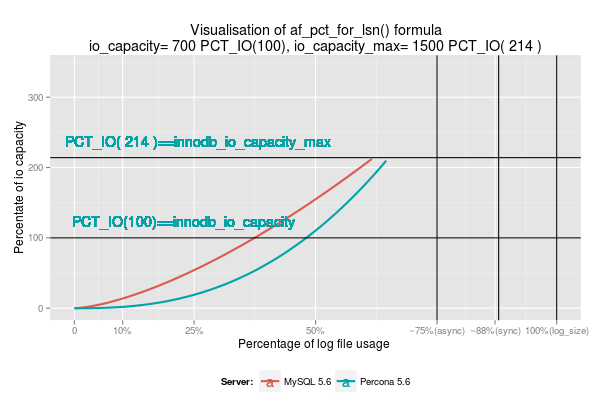
The amount of the aged pages that is possible to keep in the flush_list is limited by the combined size of the innodb log files. So the main purpose of the flush_list flushing is to flush pages from this list with such a rate that will also always allow enough free space in the log files. On the other hand, too aggressive flushing means less write combining, unnecessary load on the I/O subsystem, in the end undoing performance benefits of having larger redo logs.  In MySQL 5.6 the amount of pages to flush is calculated in the InnoDB adaptive routine based on the current checkpoint age with the following formula:

 
percentage of the IO capacity that should be used for flushing =
        ((srv_max_io_capacity / srv_io_capacity) * (lsn_age_factor * sqrt(lsn_age_factor))) / 7.5;

We modeled that formula in R and found that it’s possible to improve it such a way that the curve becomes more flat and as a result flushing becomes less aggressive. That new formula is enabled in Percona Server 5.6 by default.

Rplot04

flush_list flushing and io_capacity

InnoDB provides two variables that allow the control of the background flushing rate – innodb_io_capacity and innodb_io_capacity_max. There is quite a detailed description for these vars. However there are several things that are not really covered in the documentation:

innodb_io_capacity_max is the most important variable in case of adaptive flushing as only that variable actually limiting the flushing rate. See above formula and charts.

innodb_io_capacity is used for limiting IO operations during merging of the insert buffer and flushing in cases of server inactivity/shutdown.

For practical needs, the above means the following:

– if  the MySQL server is in an active state (serving user requests) you need to adjust innodb_io_capacity_max to increase/decrease flushing rate.
– if the MySQL server is in an idle state or performing shutdown flushing of the pages from flush_list will be limited by innodb_io_capacity value only.

– if change_buffering is ON and server is in active state it will allow to use either 5% of innodb_io_capacity or vary rate from 5% to 55%  if more than 50% of insert buffer size was already used.
– if change_buffering is ON and server is idle it will use 100% of innodb_io_capacity for merge operations

The post InnoDB adaptive flushing in MySQL 5.6: checkpoint age and io capacity appeared first on MySQL Performance Blog.